


Best Practices for Automating Patient Support Workflows

Key Takeaways
Author


Patient support automation simplifies healthcare processes, saving time and improving patient care. By integrating tools like machine learning, robotic process automation (RPA), and natural language processing (NLP), automation handles tasks such as scheduling, benefits verification, and therapy adherence tracking. This reduces administrative delays, enhances care efficiency, and ensures compliance with regulations like HIPAA.
Key Takeaways:
- Why Automation Matters: Healthcare staff spend 30% of their time on manual tasks. Automation reduces this burden.
- Benefits: Faster responses (minutes instead of hours), improved therapy adherence (61% vs. 47% manually), and reduced errors.
- Compliance: Strong governance, privacy safeguards (e.g., encryption, consent management), and regulatory alignment are critical.
- Patient-Centric Design: Map the patient journey to automate repetitive tasks while ensuring human support for complex needs.
- Technology Integration: Use tools that connect seamlessly with EHRs, CRMs, and payer systems for real-time data and secure workflows.
Automation isn't about replacing humans - it allows healthcare professionals to focus on clinical care and empathy while technology handles repetitive work.
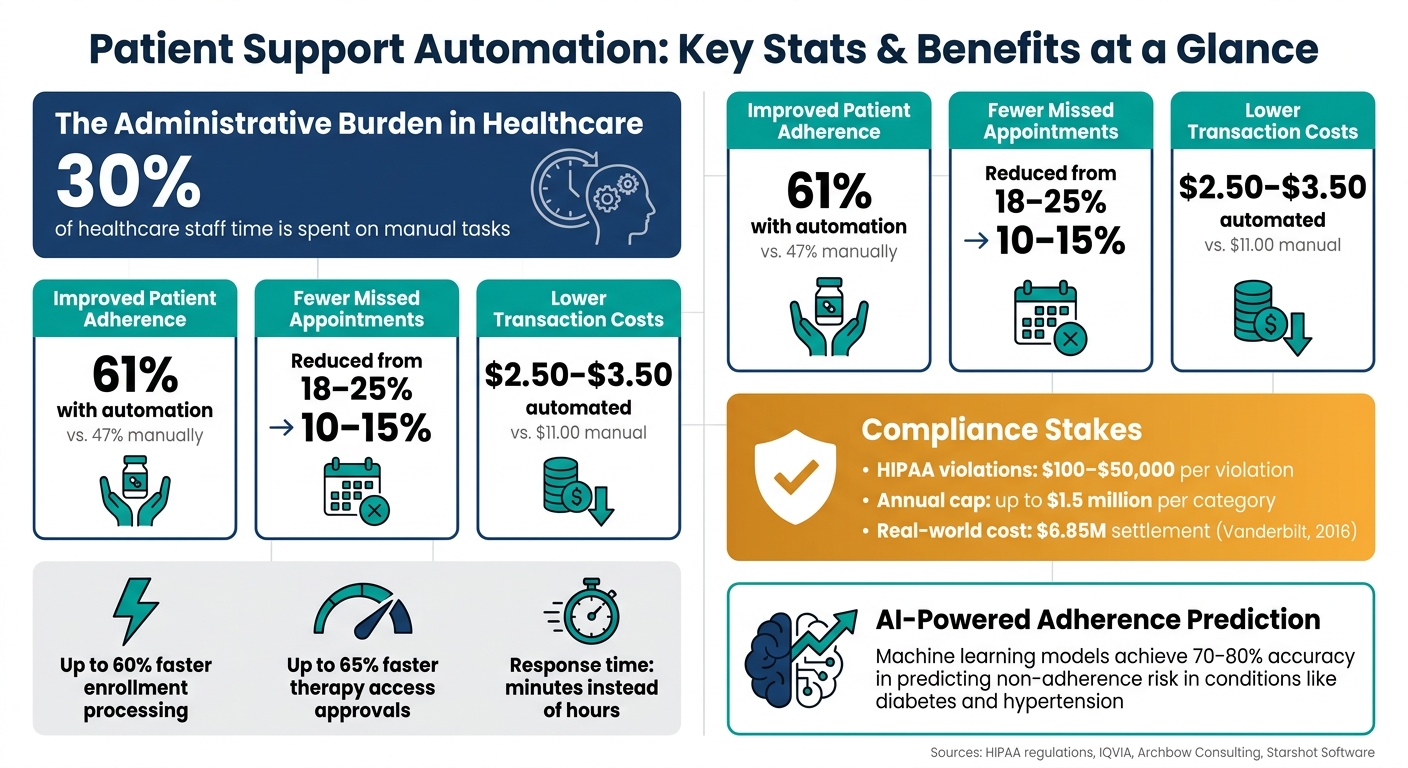
Patient Support Automation: Key Stats & Benefits at a Glance
Automate Healthcare Workflows From Patient Onboarding to Digital Support Ticket Triage
sbb-itb-8f61039
Governance, Compliance, and Risk Preparation
Before diving into coding automation logic, it’s crucial to establish a strong governance framework that can withstand regulatory scrutiny. Without this foundation, even the most well-designed workflows can become liabilities. Start by clearly defining roles and objectives to ensure accountability throughout the automation process.
Defining Roles and Objectives
Automation efforts can falter when there's no clear ownership. Strong governance depends on a cross-functional team where Compliance Officers, Privacy Officers, and CISOs work together using a RACI model (Responsible, Accountable, Consulted, Informed). Business leaders need to take ownership of automated processes - not just sign off on them. When process owners are disconnected from day-to-day operations, controls risk becoming superficial checklists, detached from real clinical workflows.
Care coordinators should focus on identifying the "minimum necessary" data needed for each task, while data analysts handle identity resolution and consent management from start to finish.
"Effective healthcare compliance automation starts with clear scope, risk‑based priorities, and controls designed for minimum‑necessary access." - Kevin Henry, Author
To track governance effectiveness, use specific performance indicators like policy attestation rates, Mean Time to Detect (MTTD) for incidents, and audit finding closure times. These metrics provide actionable insights, unlike vague compliance measures.
Regulatory and Privacy Compliance
The stakes for compliance are high. HIPAA violations can lead to penalties ranging from $100 to $50,000 per violation, with annual caps reaching $1.5 million per category. This underscores the importance of addressing systemic failures in automated systems. Ensure that Business Associate Agreements (BAAs) are in place for all vendors handling PHI, including sub-processors like AI providers, cloud services, and third-party APIs. Always request a vendor's full sub-processor list before finalizing agreements.
From a technical perspective, certain safeguards are non-negotiable: use TLS 1.2+ for data in transit, AES-256 encryption for data at rest, multi-factor authentication (MFA) for system access, and maintain immutable audit logs. Beyond HIPAA, keep an eye on the upcoming changes to 42 CFR Part 2 protections slated for 2026, which will align substance use disorder record rules more closely with HIPAA.
Automated workflows also need to distinguish between communications allowed under 45 CFR §164.506 (such as treatment or operations like appointment reminders) and those requiring explicit patient authorization under §164.508 (like marketing or research). Missteps here can result in multiple violations - one for every patient processed.
"A consent management gap in workflow logic is not an isolated patient incident - it is a policy violation that repeats for every patient the system processes until it is corrected." - Claire (The Algorithm Team)
By addressing these areas, automated workflows can remain both efficient and protective of patient care. This balance is essential for improving patient decision making and long-term outcomes.
Risk Assessment and Change Management
Risk assessment is not a one-time activity. For each automated process, evaluate its inherent risks, examine existing safeguards, and determine the residual risk. Map all PHI data flows across EHRs, portals, and third parties to identify where policy decisions need enforcement.
After identifying risks, implement technical safeguards to minimize workflow failures. Consider the case of Vanderbilt University Medical Center. In January 2016, the center reached a $6,850,000 settlement after its automated communication system failed to deliver a critical medication safety alert to a treating physician. This failure contributed to a patient’s death - not because of a security breach but due to a workflow that didn’t properly replicate safety protocols.
Design for potential failures by incorporating idempotent steps, exponential backoff retries, and dead-letter queues. Privacy restrictions under 45 CFR §164.522 should serve as hard stops that block workflow execution, rather than just triggering alerts that might go unnoticed. Finally, review and update automated rules quarterly to prevent rule drift and address emerging compliance gaps.
Designing Patient-Centered Workflow Automation
When designing workflow automation, the focus should always be on enhancing the patient journey, not just streamlining internal operations.
Mapping the Patient Journey
Start by mapping the entire care journey - everything from when a patient first notices symptoms to intake, treatment, adherence, and follow-up care. Each transition between stages, like moving from referral to triage or from diagnostics to results, presents an opportunity to integrate automation.
For example, complex cases like oncology or cardiology often involve 8–15 touchpoints over a span of 60–90 days. By involving patients, caregivers, and advocacy groups in the mapping process, you can uncover real-world barriers - like language differences or limited geographic access - that internal teams may overlook.
"It doesn't matter if the journey is 10 steps and 10 experiences, look at each step and ask how different tools and services can be combined to ensure the best possible experience." - Gregory Leighton, Vice President of Access Strategies and Patient Services, Ardelyx
For any automated interaction that allows patient responses, there must be a clinical exception routing system in place. For instance, if a patient responds with "chest pain", that message must immediately reach a human triage team within seconds - not get stuck in a general inbox.
Once key touchpoints are mapped, the next step is identifying which tasks to automate for the greatest impact.
Prioritizing Automation Opportunities
Focus on automating high-volume, repetitive tasks - like appointment reminders, eligibility checks, and preparation instructions - that often cause delays. These tasks are ideal for automation because they don’t require clinical judgment and produce consistent, measurable results.
The data supports this approach. Automated appointment reminders, for instance, can reduce no-show rates from 18–25% to 10–15%. Similarly, automating prior authorization processes can cut costs from $11.00 per manual transaction to $2.50–$3.50.
However, it's essential to strike a balance. Limit automated reminders to 2–3 messages per appointment to avoid overwhelming patients. Tailor these reminders using templates specific to each specialty - pre-visit instructions for cardiology will differ in tone and content compared to oncology workflows.
"You don't need to fix everything at once; you just need to improve what's underperforming." - Starshot Software
Once routine tasks are automated, human expertise can then be directed where it’s needed most.
Integrating Mentor-Enabled Support
While automation is excellent for routine tasks, patients dealing with new or complex treatments often need guidance from someone who has been in their shoes.
Platforms like PatientPartner are designed to bridge this gap. PatientPartner connects patients with mentors who have undergone similar treatments, medications, or surgeries. These mentors provide personalized guidance and emotional support during critical moments. This type of support doesn’t replace clinical touchpoints but instead fills the gaps, addressing practical and emotional challenges that automated systems alone cannot resolve.
Patients are increasingly drawn to peer-to-peer engagement, preferring it over traditional support models. To meet this demand, biopharma companies are creating "on-demand" support systems that extend beyond the standard 9-to-5 workday. By embedding mentorship into automation workflows - especially during high-stress stages like treatment initiation or adherence monitoring - you ensure that patients receive human connection when they need it the most.
Technology and Data Integration
Once you've mapped the patient journey and identified areas for automation, the next step is selecting and connecting the right tools. This ensures your processes remain scalable and reliable while driving overall workflow efficiency.
Selecting the Right Technology
The technology you choose should prioritize patient-centered design, balancing automation with personalized care. It’s not just about sending automated messages; your platform should support omnichannel communication - SMS, email, phone, and even mail - tailored to each patient’s preferences and permissions. Additionally, look for workflow configurability to define status models, set escalation triggers, and manage incomplete cases.
Incorporating AI capabilities can make a real difference. Features like automated enrollment validation, benefits verification, predictive adherence analytics, and real-time adverse event (AE) detection powered by Natural Language Processing can significantly streamline processes. For example, AI-augmented workflows have been shown to cut enrollment processing times by up to 60% and speed up therapy access approvals by 65%.
Another critical piece is consent management. Platforms should handle privacy requirements like HIPAA, TCPA/CAN-SPAM, and service communications separately. Combining SMS marketing consent with necessary service communications could lead to compliance risks - a well-designed system helps avoid this.
Integrating with Core Systems
Even the best platform is only as effective as its ability to connect with the systems your team already uses. At a minimum, your automation tools should integrate seamlessly with your EHR, CRM (e.g., Veeva Vault or Salesforce Health Cloud), and pharmacy claims data through REST APIs, webhooks, or SFTP. For structured clinical data exchange, use FHIR (Fast Healthcare Interoperability Resources), and for legacy event feeds like ADT (Admission, Discharge, and Transfer) notifications, rely on HL7 standards.
Patient data security is paramount. To ensure this, tokenize identities before integrating with your CRM and use a separate resolution service. All integrations must meet HIPAA compliance standards. Adopting an event-driven architecture ensures real-time updates for consent revocations or status changes, eliminating delays caused by batch synchronization.
"The goal is to store the minimum set of fields that allow enrollment, education, and ongoing support to run consistently, while supporting compliance and measurement." - Ashley DiSanto, VP of Client Services, Pulse Health
This seamless integration not only enhances clinical operations but also ensures accurate data feeds into your performance metrics.
Defining Data Models and KPIs
To automate insights effectively, establish a solid foundation with a stable patient master ID, consent event log, enrollment status objects, and engagement records. Without these, your reporting risks becoming a manual, error-prone task instead of a streamlined, automated process.
With integrated systems in place, a well-structured data model ensures every patient interaction is measurable and actionable. Align your KPIs with the patient journey events you’ve already mapped. Below is a breakdown of essential metrics to track:
| KPI Category | Key Metrics |
|---|---|
| Enrollment | Conversion rate (started-to-complete), time-to-complete, enrollment by channel |
| Therapy Access | Prior authorization success rate, time-to-therapy-start |
| Adherence | Refill behavior at 30/90/180/360 days, 12-month persistence rate |
| Engagement | Education module completion rate, message open/click rates |
| Patient Experience | CSAT, NPS, patient confidence scores |
| Compliance | Opt-in/out rates by channel, HIPAA authorization status |
"Simpler models built on clean, well-structured data consistently outperform more sophisticated approaches built on fragmented or inconsistent records." - Michelle Kelts, Sr. Director, Strategic Operations, Patient Access and Support Services, IQVIA
Taking a phased approach is often the most effective strategy. Start with the highest-impact integration - such as specialty pharmacy - and pilot it for about 8 weeks. This allows you to validate identity matching before expanding to other areas like nurse services or financial assistance programs. By doing this, you can catch and address data mismatches early, preventing larger issues down the line.
Monitoring, Optimization, and Scaling
Once your data model and integrations are in place, the real work begins. Automation isn’t a “set it and forget it” solution - it demands ongoing monitoring, regular adjustments, and a clear plan for growth.
Monitoring and Optimization
Start by putting key performance metrics into action right away. A weekly review of your exception queue is essential - if you notice repeated manual interventions, it’s a signal to create new automated rules or refine AI prompts.
Shift your focus from metrics like throughput and latency to more meaningful outcomes, such as time-to-therapy, patient persistence, and overall confidence.
"A patient's experience, including friction across touchpoints, gaps between interactions, and transitions from automated systems to human experts, is a measurable outcome that must be considered during program design, not retrofitted later." - Michelle Kelts, Sr. Director, Strategic Operations, Patient Access and Support Services, IQVIA
A/B testing is a great tool for fine-tuning your approach - experiment with message timing, the mix of communication channels, and content. You can also use NLP-based adverse event detection to monitor patient conversations in real time. This not only ensures compliance with pharmacovigilance requirements but also reduces the need for manual reviews.
These optimizations lay the groundwork for scaling operations across different regions and therapy areas.
Scaling Across Regions and Conditions
When it’s time to expand, standardizing your operating model is key. Define consistent workflow stages - like intake, validation, routing, decision-making, fulfillment, and escalation - so you can add new therapy areas or regions without starting from scratch. Using a standardized data schema for all patient support events helps avoid duplicate integration logic and ensures consistent reporting across regions.
Centralize consent and eligibility rules into a single source of truth. This prevents patients from receiving conflicting or redundant messages as your program grows. Make these permissions modular and portable - for example, separate rules for SMS, email, and phone - so compliance remains intact at scale. For any automated response that flags a clinical concern, ensure it’s routed immediately to a credentialed triage queue.
Using Data to Guide Future Growth
Segment your KPIs by therapy type, payer, age group, and communication channel to identify underserved populations. These metrics not only show how your program is performing but also help guide adjustments for larger-scale implementation. For instance, machine learning models have achieved 70–80% accuracy in predicting patients at risk of non-adherence in conditions like diabetes or hypertension. This allows for proactive outreach before patients drop off.
Platforms such as PatientPartner take data-driven strategies further by connecting patients with mentors who provide real-time guidance during their treatment. As your automated workflows evolve, incorporating peer mentorship can uncover friction points that dashboards might miss. These insights help refine your support strategies and improve patient outcomes over time.
"The next generation of patient support will not be defined by more services. It will be defined by smarter orchestration." - Archbow Consulting
Conclusion and Key Takeaways
When it comes to patient support automation, a few guiding principles stand out. At its core, automation in this space is about improving care, maintaining compliance, and making processes more efficient. But success hinges on thoughtful design - not just the technology itself.
One of the most critical principles is this: Compliance is non-negotiable. As mentioned earlier, violations of HIPAA regulations come with severe consequences, making HIPAA-compliant automation a necessity for data security. Any vendor dealing with Protected Health Information (PHI) must sign a Business Associate Agreement, and real-time consent verification is essential - relying on a one-time checkbox just doesn’t cut it. Another key factor? Patient-centered design. Mapping out the entire patient journey before implementing automation helps uncover gaps that technology alone can’t address. Research shows that automated workflows built on clean, organized data perform far better than even the most advanced systems running on fragmented information. In other words, simplicity done well beats complexity done poorly.
Metrics also matter - and the focus should be on outcomes, not just operational performance. For example, tracking time-to-therapy, 12-month persistence rates, and refill behaviors at intervals like 30, 90, 180, and 360 days provides much deeper insights into program effectiveness than metrics like call handle times or throughput. Tools like PatientPartner enhance these efforts by incorporating real-time peer mentorship, which can uncover friction points that dashboards alone might miss.
"The purpose of AI in patient support is to free clinical experts to do the work only they can do; conversations that require genuine expertise, empathy, and human connection." - Michelle Kelts, IQVIA
The best approach? Start small, standardize processes early, and scale thoughtfully. For instance, begin with straightforward, high-volume workflows like appointment reminders. Once those are running smoothly, move on to more complex tasks like claims management or referrals. Ultimately, automation should speed up access to therapy, keep patients engaged over time, and improve outcomes - all while staying rooted in a patient-first support model that integrates governance, thoughtful design, and reliable data at every step.
FAQs
What should we automate first in patient support?
Processes that are repeatable, follow clear guidelines, involve several systems, and demonstrate measurable inefficiencies are perfect starting points. Patient intake is a standout example - it’s a high-volume, structured process that can significantly reduce wait times when optimized. Other critical areas to consider include benefits investigation, eligibility verification, and prior authorizations. Automating these tasks not only streamlines operations but also allows specialists to concentrate on providing more personalized and complex support, leading to a workflow that’s both efficient and patient-focused.
How do we keep automated workflows HIPAA-compliant?
To maintain HIPAA compliance in automated workflows, it's crucial to follow a thorough approach that addresses every stage of the data lifecycle. Here’s how you can do it:
- Sign Business Associate Agreements (BAAs): Ensure all vendors and sub-processors have agreements in place that outline security measures and breach response procedures.
- Minimize Data Access: Only allow access to the specific data fields necessary for each task - nothing more.
- Implement Strong Encryption: Use robust encryption standards like TLS 1.2 (or newer) for data in transit and AES-256 for data at rest. Keep detailed, time-stamped audit logs to track all activity.
- Apply Granular Access Controls: Restrict access based on roles and responsibilities, and securely delete data when it's no longer required.
By sticking to these practices, you can safeguard sensitive information and align your workflows with HIPAA requirements.
What should happen when a patient reports an urgent symptom?
When a patient reports an urgent symptom during an automated workflow, the system should never rely solely on automated acknowledgments. Instead, there must be a pre-defined clinical escalation pathway in place to guarantee an immediate response from a human. The system should be configured to bypass routine automation for urgent concerns, directing them straight to staff for prompt intervention. Establishing these pathways before launching clinical workflows is essential to ensure compliance and protect patient safety.