


How to Ensure HIPAA Compliance in Patient Mentorship

Key Takeaways
Author


If your mentorship program handles a patient’s name, diagnosis, treatment details, or call notes, HIPAA applies from the start. And with 95% of patients worried about medical record breaches and 54% concerned about vendor privacy and security, weak controls can hurt both compliance and patient confidence.
Here’s the short answer: I make patient mentorship HIPAA-compliant by controlling data at four points:
- Map every PHI touchpoint: intake forms, mentor matching, calls, messages, notes, reports, exports, and deletion
- Lock down systems and workflows: encryption, MFA, role-based access, audit logs, secure messaging, and device rules
- Set legal guardrails: BAAs for vendors, written authorizations when needed, and strict limits on sponsor reporting
- Train staff and prepare for incidents: role-based HIPAA training, access reviews, security testing, and a breach response plan
A few rules matter most:
- Use the minimum necessary data
- Keep treatment details out of regular SMS and email
- Let mentors see only the patients assigned to them
- Use de-identified or aggregated data for sponsor reports when possible
- Keep HIPAA records, logs, and training history for at least six years
This article breaks down the steps in plain English so you can build a mentorship program that protects PHI, limits vendor risk, and keeps day-to-day work inside HIPAA rules.
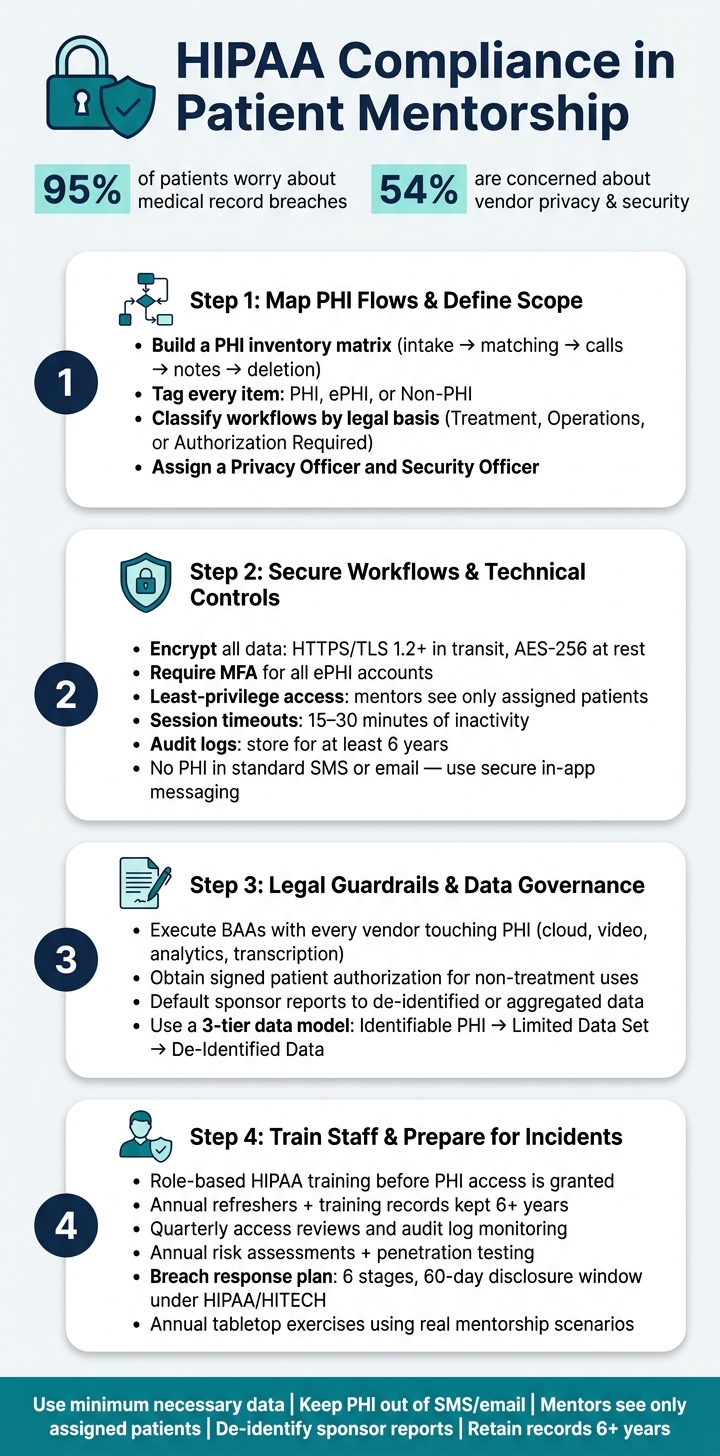
HIPAA Compliance in Patient Mentorship: 4-Step Framework
HIPAA Compliance Check: 10 Steps to Protect Patient Data webinar
sbb-itb-8f61039
Step 1: Map PHI Flows and Define Program Scope
Before you pick a platform or bring on your first mentor, map exactly how patient data enters the program, where it goes, and where it ends up. That PHI map sets the scope of the program and shows the control points. From there, you can classify data use, set access rules, and draw clear lines around what vendors can and cannot touch.
Document Every Point Where PHI Is Collected, Stored, Shared, or Viewed
Start with a PHI inventory matrix. Put each workflow on its own row, then track how patient data is handled at each step. Go through the full lifecycle: intake, eligibility, matching, scheduling, check-ins, notes, reporting, archiving, and deletion. Also include web forms, calls, dashboards, exports, analytics, and sponsor integrations.
For each step, write down:
- What PHI is collected
- Who can access it
- Where it is stored
- How it is transmitted
Tag every item as PHI, ePHI, or non-PHI so it’s clear where Security Rule controls apply. A phone call may involve PHI. Secure messaging threads, cloud-stored session notes, and patient dashboards will usually contain ePHI.
Use SMS and consumer messaging apps only for neutral reminders, like appointment reminders. Keep treatment details inside a secure, encrypted platform.
Once the inventory is done, classify each workflow by legal basis.
Separate Treatment Support from Non-Treatment Data Uses
Support that helps a patient understand or follow a therapy plan will usually fall under treatment or care coordination. Data uses tied to commercial performance reviews, prescriber targeting, or marketing are a different story and may need patient authorization.
Build a data use classification table that labels each workflow and records the legal basis for it. This helps keep PHI out of sponsor reports and analytics pipelines that should not receive it.
| Workflow | Data Use Category | Legal Basis |
|---|---|---|
| Mentor-patient matching by diagnosis or procedure type | Treatment / Care Coordination | Treatment basis |
| Adherence check-in calls | Treatment / Care Coordination | Treatment basis |
| Aggregated performance dashboards | Health Care Operations | Operations basis |
| Patient-level sponsor reports with names | Analytics / Marketing | Authorization required or data must be de-identified |
| Satisfaction surveys used to improve the program | Health Care Operations | Operations basis |
After classification, assign one owner to approve changes and enforce access.
Assign Clear Ownership for Privacy and Security Decisions
Name a Privacy Officer and Security Officer, or one person to handle both in a smaller team. That person should keep the inventory up to date, approve new data flows and integrations, review vendor agreements, and lead incident response if something goes wrong.
Access should follow function, not convenience. Mentors may need a patient’s first name or preferred name, treatment details tied to their role, and general timing. They do not need the full medical record or insurance ID. Care coordinators may need more contact and scheduling data. Sponsor contacts should see only aggregated, de-identified metrics.
Write these limits into a role-based access policy and enforce them through user permissions in every system that touches PHI. Review access rights at least once a year, and remove them right away when a mentor or staff member leaves.
A standard onboarding and offboarding process helps keep this tight. Verify identity, assign role-specific accounts, require training before PHI access, and cut off access immediately at exit.
Step 2: Build HIPAA-Compliant Workflows and Technical Controls
After you map how PHI moves through your program, the next job is turning those boundaries into day-to-day rules. That means platform permissions, communication guardrails, and device policies. Start with encryption, access, and logging. Those three set the floor for everything else.
Apply Encryption, MFA, Access Controls, and Audit Logging
Encrypt every system that stores or sends patient data, both in transit and at rest. In practice, that means HTTPS/TLS 1.2 or higher for browser, mobile, and API traffic, plus AES-256 for databases, file storage, notes, and backups. The same rule applies to analytics and logging systems if they contain PHI.
Require MFA for every account with ePHI access. App-based authenticators and hardware tokens are stronger than SMS-only codes.
Access should follow a least-privilege model. Mentors should see only assigned patients. Sponsors should see only de-identified or aggregated data. Admins should get only the access tied to their role. Set automatic session timeouts after 15 to 30 minutes of inactivity, and require re-authentication for sensitive actions like exporting reports. Apply these controls anywhere PHI can move, including backups, exports, and logs.
Audit logs are what make all of this reviewable. Each log entry should record:
- User identity
- Timestamp with time zone
- Action taken
- Record affected
- Source IP or device ID
Log PHI reads, edits, exports, permission changes, and admin actions. Store logs in a centralized, tamper-resistant location. Limit who can change them, and keep them for at least six years to line up with HIPAA documentation rules.
Once you can trace access, the next step is tightening how mentors share patient information.
Secure Communication Across SMS, Email, Calls, and Video
Keep clinical conversations inside a secure, encrypted platform. Use consumer channels only for low-risk logistics. Mentors should never put diagnoses, medication names, lab results, or treatment details in standard SMS or email. A text, for example, can tell a patient to log into the app for an update. It should not include a clinical summary.
Use the channel rules below:
| Channel | HIPAA-Compliant Use | Required Safeguards |
|---|---|---|
| Secure in-app messaging | PHI allowed | Encryption in transit and at rest, role-based access, audit logging |
| Standard SMS | Logistics only (no PHI) | Opt-in consent where required, no clinical detail, minimal identifiers |
| Regular email | Logistics only (no PHI) | Secure gateway, no diagnoses or treatment info, verify recipients |
| Phone calls | PHI allowed with controls | Identity verification, private environment, notes documented in platform |
| Secure in-platform video | PHI allowed | Encrypted sessions, waiting rooms, no recording unless consented, private space |
| Consumer video tools | Avoid for PHI | Limit to non-PHI use |
Voicemail should be short and neutral. Mentors should avoid leaving clinical details and should follow any patient preferences about voicemail.
Of course, channel rules alone won't save you if the device on the other end is loose.
Physical Safeguards for Remote and Hybrid Mentor Teams
Remote mentors are often where physical security starts to slip. The baseline is simple: company-managed, encrypted devices, strong passwords, automatic screen lock, and full-disk encryption. Personal family computers and public kiosks should never be used for PHI access.
MDM software helps enforce those settings from a central place and lets your team wipe a device if it's lost or stolen. Limit local storage of patient files. Mentors should enter session notes directly into the platform, not stash them in a desktop folder or personal cloud drive. If printed notes are ever needed, keep them minimal, store them in a locked container, and shred them right after use.
Public Wi-Fi is a common risk. Mentors should use a corporate VPN whenever they access PHI outside a trusted network, and they should never conduct phone or video sessions in public places. It also helps to use an onboarding checklist before first login so each mentor is cleared on approved devices, network rules, and screen privacy.
Step 3: Put Contracts, Authorizations, and Data Governance in Place
Controls protect PHI. Contracts decide when it can move. Step 3 puts the legal rules and patient permissions in place for every PHI disclosure. Once the workflow is under control, the next move is to lock down the terms behind each disclosure.
Execute BAAs with Every Vendor That Touches PHI
Under 45 C.F.R. § 164.504(e), a Business Associate Agreement (BAA) must be in place before PHI is shared with any vendor that creates, receives, maintains, or transmits it on your behalf. That includes cloud, messaging, video, analytics, transcription, and storage vendors.
OCR has repeatedly penalized missing or incomplete BAAs. So signed BAA review should be a hard procurement gate. No system credentials, no data access, and no pilot launch until legal confirms a signed BAA is on file.
Keep a live business associate registry that shows each vendor's role, BAA effective date, and renewal cycle. Review it at least once a year. Each BAA should spell out:
- Permitted uses and disclosures of PHI
- Security duties
- Breach notification timelines
- Subcontractor flow-down requirements
- How PHI will be returned or destroyed when the contract ends
Use Clear Authorizations for Non-Treatment Support and Reporting
Once vendor contracts are in place, the next issue is simple: which patient uses still need direct permission?
Use a signed authorization whenever PHI is used outside treatment, payment, or operations. A compliant authorization should say exactly what PHI may be used or shared, who may receive it, the purpose in plain language, an expiration date or event, and how patients can withdraw authorization. Any sponsor reporting, program evaluation, or outreach use should be spelled out in plain language. Signed authorizations and revocations should be kept for at least six years.
Revocation handling also needs to be built into the workflow. If a patient withdraws authorization, update what the mentor can view and discuss. Then remove the patient from any sponsor reporting feeds. This ensures that mentorship’s impact on patient decision making is tracked ethically and legally. Periodic audits that compare consent logs against actual data use help keep mentor interactions and reporting in line with patient preferences.
Limit PHI in Sponsor Reporting and Analytics
The minimum necessary standard means non-treatment uses and disclosures should be limited to the smallest amount needed. In practice, sponsor dashboards should default to aggregated metrics instead of patient-level records.
Use de-identified data or limited data sets by default. Use identifiable PHI only when there is a documented business need and legal basis.
These data tiers help keep sponsor reporting out of patient-level PHI by default.
| Data Type | Allowed Uses in Mentorship Programs | Required Agreements | Key Governance Controls |
|---|---|---|---|
| Identifiable PHI | Direct program operations, care coordination, internal quality improvement; sponsor use only with a clear authorization basis | BAAs with all vendors handling PHI | BAA required; access limited by role |
| Limited Data Set | More detailed analytics, such as geography, dates, and utilization, with most direct identifiers removed; restricted sponsor projects | Data Use Agreement (DUA) specifying permitted uses and prohibition on re-identification | DUA required; query review before external sharing |
| De-Identified Data | Routine sponsor reporting, benchmarking, publications, and dashboards where individual identity is not needed | No HIPAA-mandated BAA for de-identified data alone, though contracts can still govern use and redistribution | Periodic re-identification review; no BAA required for de-identified data alone |
Escalate to identifiable PHI only when the legal basis is documented.
With the tiers set, staff need to know how to use them day to day. That means training people on the rules and checking for misuse before it turns into a bigger problem.
Step 4: Train, Monitor, and Respond to Incidents
With PHI flows mapped and controls set, the last job is making sure people follow the rules day in and day out. Once the program goes live, compliance comes down to daily behavior.
Train Mentors and Staff on Role-Specific HIPAA Scenarios
Basic HIPAA training doesn't cut it for patient mentorship. Mentors need hands-on guidance for the situations they face in their actual work: verifying identity on mentor calls, handling family involvement in care decisions, sharing only the minimum needed in secure messages, and knowing when to escalate a problem. That's why pre-access training is mandatory.
Require role-based onboarding before anyone gets PHI access. Then provide annual refreshers that cover policy updates, new tools, and lessons from recent incident reviews.
Remote mentors need direct instruction on workspace security too, including:
- Private workspaces
- Screen locks
- Encrypted devices
- No shared family computers
Training records need to stay audit-ready. Completion logs should include the mentor's name, role, training module and version, completion date, and assessment score, and they should be kept for at least six years. Keep training completion logs available for audits.
Monitor Access, Review Audit Logs, and Test Security Regularly
Access controls don't mean much if no one checks them. Quarterly access reviews should confirm that role-based access still matches current rosters, that departed mentors were deprovisioned fast, and that no one still has elevated privileges without a documented reason. Those reviews should feed straight into risk remediation.
Use centralized audit trails, role-based access, and documented review workflows. Logs should show who accessed records, when, from where, and what changed. That gives teams a way to catch unsafe mentoring patterns early. Reviewers should flag issues such as access outside normal hours, repeated viewing of records not assigned to a mentor, or unusual data export activity.
Security testing should run on a set schedule. At a minimum, that means an annual risk assessment, plus periodic vulnerability scans and penetration tests. Results should go into a formal risk register with remediation owners and target dates. If testing finds a gap, the response plan should spell out what happens next.
Build a Breach Response Plan and Review Key Steps
A breach response plan only works if it's written down, assigned, and practiced. Under HIPAA and HITECH, reportable breaches must be disclosed to affected individuals and HHS/OCR within 60 days of discovery. That window closes fast when roles aren't assigned ahead of time and steps aren't documented.
A clear PHI map makes containment much faster. The plan should cover six stages:
- Immediate reporting by mentors or staff when something seems off
- Initial containment, such as revoking compromised credentials or isolating affected accounts
- Investigation to determine what PHI was involved and for how long
- A formal risk assessment under HITECH's breach notification standards
- Notification to individuals, sponsors, and regulators when required
- A post-incident review to fix the root issue and update training
Annual tabletop exercises can help a lot here. Use realistic mentorship scenarios, like an accidental disclosure during a group call, so the team can work through the process before a live incident hits.
Each step supports the next.
FAQs
Does a patient mentorship program always fall under HIPAA?
Yes - if a patient mentorship program handles, transmits, or stores Protected Health Information (PHI), it must comply with HIPAA.
These programs often involve steady communication between patients and mentors, plus some level of data sharing. That puts them under federal privacy and security rules in many cases.
To meet HIPAA requirements, the program needs safeguards such as:
- Encryption
- Role-based access controls
- Audit logs
These steps help protect patient privacy and lower the risk of regulatory penalties.
What counts as the minimum necessary PHI for mentors?
The minimum necessary standard means mentors should access or use only the Protected Health Information (PHI) needed to do their job.
Here’s the simple version: if a mentor is helping with medication adherence, they need only the information tied to that task - not a patient’s full medical history, financial details, or a broad family health history.
That same idea applies to communication, too. When possible, mentors should leave out sensitive details in reminders, including specific conditions. In practice, that means keeping messages tight and focused on what the patient needs to do, without adding extra personal health information.
When are patient authorizations and vendor BAAs required?
Patient authorizations are required to record consent for mentor involvement. That authorization should spell out the mentor’s role and explain how patient data will be used, shared, and protected.
Vendor BAAs are required any time a third party processes PHI on your behalf. If you send PHI through any service without a signed BAA, that’s a HIPAA violation. That means all partners, workforce members, and contractors who handle PHI must meet these rules.