


Checklist for HIPAA-Compliant API Development
Key Takeaways
Author


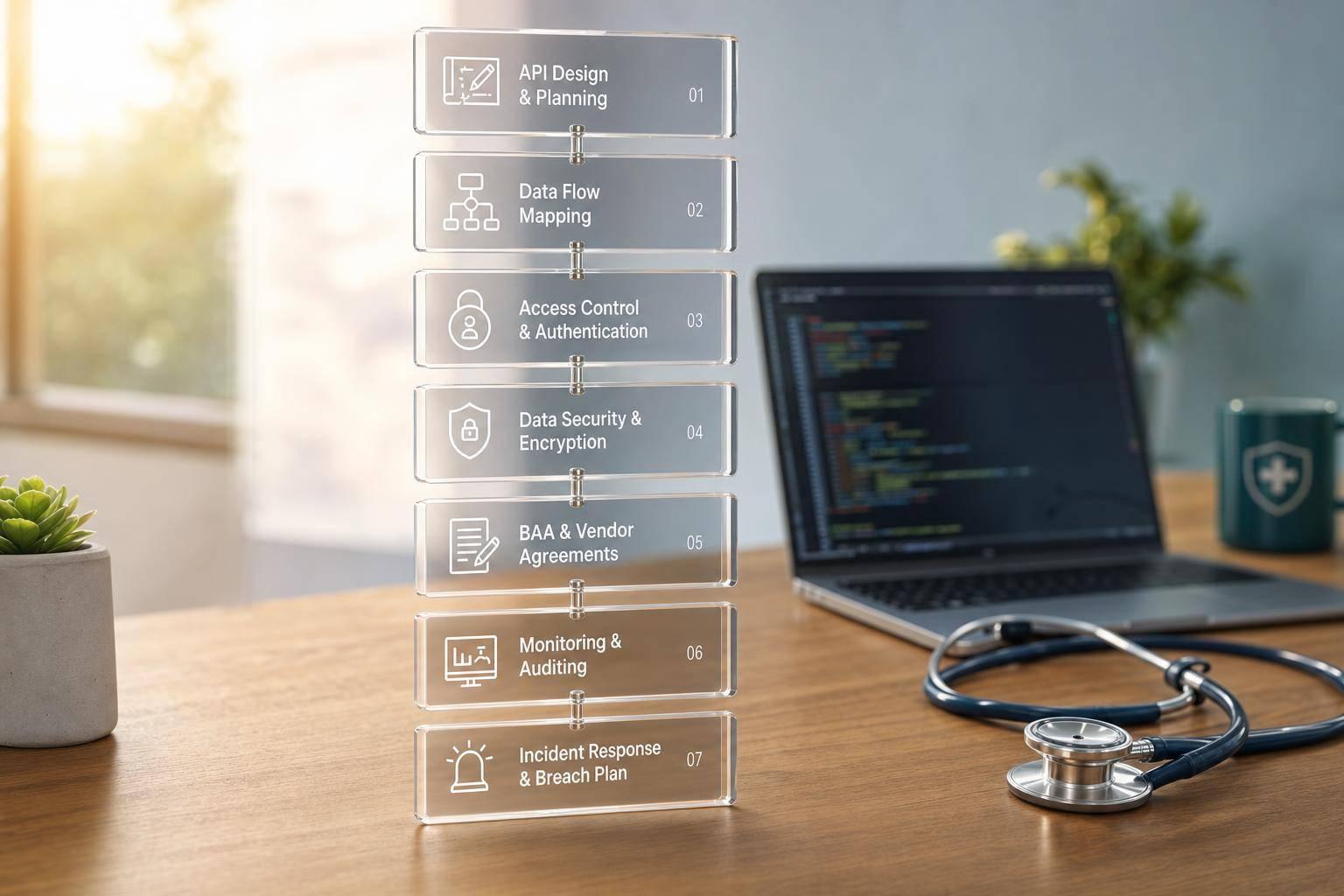
If my API touches patient data, HIPAA work starts before I write code. I need to know what counts as PHI, map where it moves, lock down access, encrypt data, scrub logs, sign BAAs with any PHI-handling vendor, and monitor the system after launch.
Here’s the short version:
- I treat PHI broadly, not just diagnoses or lab results
- I include prod, staging, logs, backups, and vendor tools in scope if they touch PHI
- I build around HIPAA’s 3 rule areas: privacy, security, and breach response
- I use least-privilege access, short-lived tokens, MFA, TLS 1.2+, and AES-256
- I keep PHI out of logs, errors, URLs, and test data
- I do not send PHI to a vendor until the BAA is signed
- I keep audit trails, access reviews, restore tests, and alerts in place after release
A few facts shape the whole job. HIPAA lists 18 identifiers that can make health data identifiable. And under HIPAA, systems that create, receive, maintain, or transmit PHI are in scope - even if that’s just a queue, backup, or staging setup.
| Area | What I need to do |
|---|---|
| PHI scope | List endpoints, fields, systems, and environments that touch PHI |
| Data flow | Map where PHI enters, moves, stores, and leaves |
| Access | Use named accounts, OAuth 2.0/OIDC, MFA, and least-privilege rules |
| Data security | Encrypt in transit and at rest; protect secrets and backups |
| Logging | Keep audit logs, but redact PHI and secrets |
| Vendors | Review each service and get a BAA before PHI flows |
| Production | Segment networks, test restores, review access, and watch alerts |
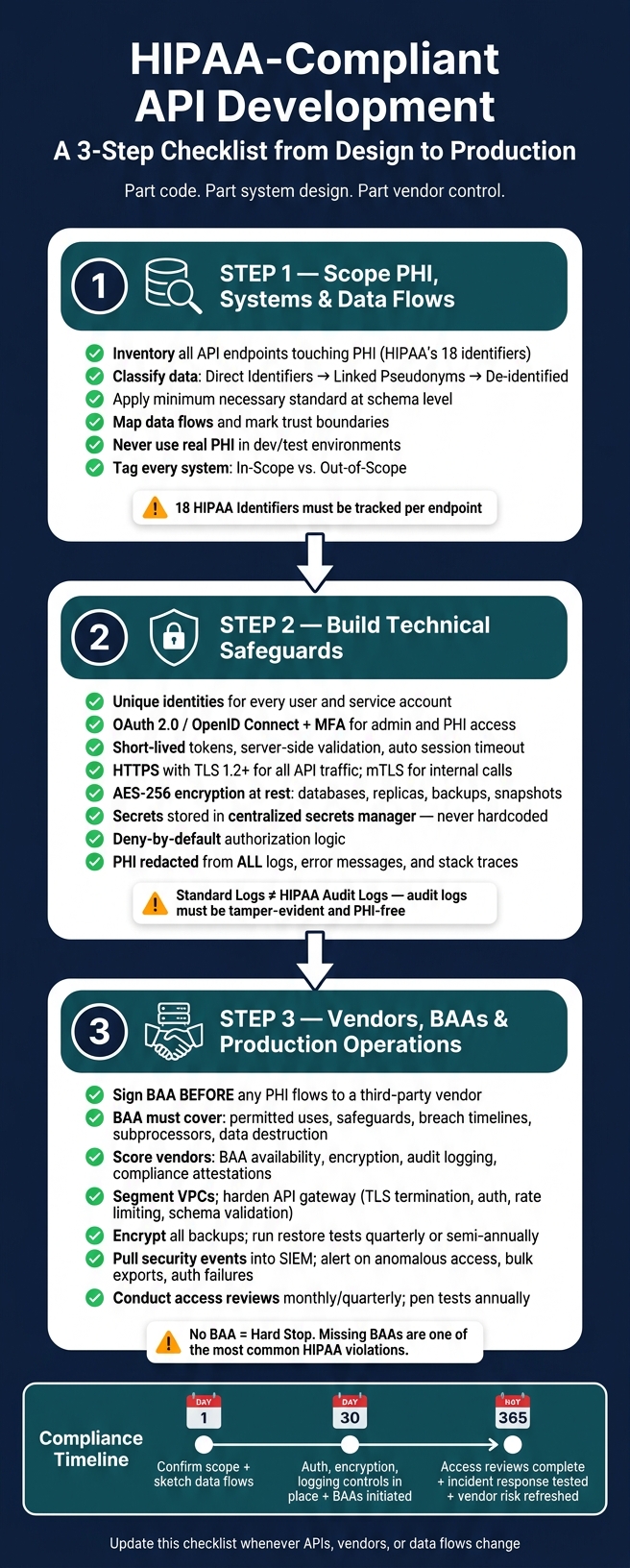
So if I had to boil the article down to one line, it would be this: HIPAA-compliant API work is part code, part system design, and part vendor control.
HIPAA-Compliant API Development: 3-Step Compliance Checklist
How to Build HIPAA-Compliant Healthcare Software in 2026 | Appinventiv
sbb-itb-8f61039
Step 1: Scope PHI, Systems, and Data Flows Before Coding
Once you've mapped the rules, the next job is simple in theory and messy in practice: figure out exactly where PHI lives, where it goes, and who touches it. Do that before anyone starts building.
This step turns HIPAA from a policy document into a system-by-system map you can actually use.
Inventory Endpoints, Data Elements, and Environments
Before coding, list every place PHI enters, moves through, and gets stored. Build an API inventory that acts as a living catalog of every endpoint that reads, writes, updates, exports, or deletes PHI. Start with your OpenAPI specs and gateway configs. Then go one step further and manually check for undocumented endpoints, because those are often where trouble starts.
For each endpoint, record which of HIPAA's 18 identifiers it touches. That includes names, dates of service, IP addresses, device IDs, and medical record numbers. Then sort that data by exposure level:
- Direct identifiers
- Linked pseudonyms
- De-identified data
That grouping shapes your access control rules and shows where field-level encryption is needed.
Apply the minimum necessary standard at the schema level. An appointment reminder endpoint needs a patient's name, phone number, and appointment time. It does not need the patient's full problem list or medication history.
A mentorship-matching workflow, like those PatientPartner supports for pharmaceutical and med-tech clients, may need diagnosis and procedure context for a valid use case. Even then, it can rely on anonymized clinical categories such as "Type 2 diabetes, on GLP-1 therapy" until a patient gives clear consent to connect with a specific mentor.
Do not use real PHI in dev or test. Use synthetic or de-identified data instead. If there's an exception, treat it as approved, time-limited, and logged. And if staging includes production data, treat staging as in scope.
This inventory becomes the starting point for the access, encryption, and logging controls in Step 2.
Document Data Flows and Trust Boundaries
After the inventory is done, trace how PHI moves in practice. A data flow diagram should follow PHI from its entry point - such as a patient-facing portal, clinician dashboard, or partner API - through each processing layer, including the API gateway, microservices, and background workers. From there, track it into storage like databases, object stores, and queues, and then out through reports, exports, or downstream vendor calls.
The part you need to mark with extra care is the trust boundary. That's the point where PHI moves from one security domain into another. Common examples include traffic moving from the public internet to your API gateway, from your internal VPC to a third-party vendor network, or from your application subnet to your database subnet.
Controls often shift at those boundaries. Encryption rules may change. Authentication may change. Logging may change. And in some cases, a BAA may be needed.
For each flow, add the protocol details, such as TLS 1.2+ and HTTPS, the data format, such as JSON or FHIR, and the trigger behind the flow, whether that's a user action, scheduled job, or webhook. Record an approval date for each flow - for example, "Data Flow v2 approved: 02/10/2026" - along with sign-off from both security and compliance stakeholders. That gives you an audit trail showing the risk review happened before the build, not after.
In-Scope vs. Out-of-Scope Systems Table
Use this table to split in-scope systems from out-of-scope environments. Include every system that can create, receive, maintain, or transmit PHI.
| System / Service | PHI Involvement | Applicable HIPAA Rules | Required Controls |
|---|---|---|---|
| Public Patient API Gateway | Yes - identifiers and clinical data | Security Rule, Privacy Rule | TLS 1.2+, OAuth2, audit logging, firewall rules |
| Mentorship Platform (e.g., PatientPartner) | Yes - treatment journey, outcomes, mentor interactions | Security Rule, Privacy Rule | Encryption, vendor risk assessment, access controls |
| Analytics Data Warehouse | No, if properly de-identified; yes, if it stores a limited data set | Security Rule (if in scope), Privacy Rule | De-identification validation, access control, logging |
| Notification / Messaging Queue | Yes - may carry appointment or treatment context | Security Rule | Encryption at rest and in transit, access control, retention policy |
| Developer Sandbox Cluster | No - synthetic data only | Out of scope | No PHI; routine access reviews |
| Third-Party Error Monitoring (e.g., Sentry, Datadog) | Conditional - scrub PHI before export | Security Rule if PHI present | PII/PHI scrubbing in SDK config, BAA if PHI flows through |
Review and update this table any time you add a new API, vendor, or environment. Record the last review date in MM/DD/YYYY format - for example, "Scope table last updated: 06/09/2026" - so the record stays audit-ready.
Step 2: Build Technical Safeguards Into the API
Build controls that protect PHI in code and infrastructure. HIPAA's Security Rule defines technical safeguards as the mechanisms that protect ePHI and control access to it. So the next priorities are identity, access, encryption, and logging.
Enforce Identity, Access, and Session Controls
Every user and service account that touches PHI needs a unique identity. Don't allow shared API keys or team credentials. Keep service accounts separate from human users. Use OAuth 2.0 or OpenID Connect for delegated access, and require multi-factor authentication for administrators and for any action that can read, export, or modify PHI.
Authentication alone isn't enough. You also need authorization rules at the resource and scope level for read, write, and break-glass access. Use RBAC or ABAC so a valid token still can't reach another patient's record.
Token lifecycle matters just as much as issuance. Keep access tokens short-lived, rotate refresh tokens, validate tokens server-side on every request, and revoke access right away when a user leaves or a device is compromised. Enforce automatic session timeout at both the application layer and the identity provider, especially for privileged users.
Once access is locked down, the next step is protecting PHI in transit, at rest, and across internal code paths.
Secure PHI in Transit, at Rest, and in Code Paths
All API traffic carrying PHI must use HTTPS with TLS 1.2 or higher. Endpoints should reject plain HTTP outright instead of quietly redirecting users to secure transport. For internal service-to-service calls, mTLS verifies both sides of the connection. That matters in microservice setups where multiple backend services exchange PHI.
PHI at rest needs AES-256 encryption across primary databases, replicas, object storage, snapshots, and backups. Unencrypted backup media is a common compliance gap. Manage keys separately from the data they protect, and keep rotation schedules plus audit trails for key access.
Secrets - API keys, signing keys, database credentials, OAuth client secrets - must never be hardcoded or committed to source control. Store them in a centralized secrets manager, retrieve them at runtime through identity-based access, and rotate them on a set schedule or after any suspected exposure.
For authorization, use deny-by-default logic, validate all inputs against a strict schema, and reject unexpected fields before business logic runs. These controls cut the risk of broken object-level authorization, excessive data exposure, and mass assignment. And just as important, redact PHI from all logs, error messages, and stack traces. Error responses should stay generic. They should never echo back patient identifiers, request payloads, or secrets to the caller.
Standard Logging vs. HIPAA-Grade Audit Logging Table
Standard application logs are built for debugging. HIPAA-grade audit logs are built for accountability.
| Dimension | Standard Logging | HIPAA-Grade Audit Logging |
|---|---|---|
| Identity detail | Basic user ID and timestamps | Authenticated user identity, role, and purpose |
| PHI exposure risk | High - may capture request bodies, query strings, or identifiers | Low - PHI and secrets are explicitly redacted or tokenized |
| Retention duration | Short and inconsistent | Policy-driven and aligned with organizational requirements and legal expectations |
| Tamper-evident storage | Minimal | Tamper-evident or immutable storage, forwarded to a SIEM |
| Monitoring coverage | Operational errors and performance | Security events, PHI access, authorization failures, and anomalies |
Access controls aren't complete without auditability. Audit logs should record who accessed what, when, from where, and whether access succeeded or failed, using structured fields and restricted storage.
Step 3: Control Vendors, BAAs, and Production Operations
Technical safeguards help, but they don't carry the whole load. The moment your API connects to a third-party service or moves into production, a lot of the risk shifts to contracts, vendor review, and day-to-day operating controls.
Verify Third-Party Integrations and Sign BAAs
Any external service that can create, receive, maintain, or transmit PHI counts as a business associate under HIPAA. That means no PHI should flow until the BAA is signed. This covers cloud platforms, storage providers, gateways, logging tools, monitoring systems, messaging platforms, analytics tools, and external API vendors.
Skipping this step creates direct HIPAA risk. Missing BAAs are one of the most common HIPAA failures, and one of the easiest to prevent.
A BAA should spell out:
- permitted PHI uses and disclosures
- required safeguards
- breach notification timelines
- subprocessor duties
- PHI return or destruction when the contract ends
Don't assume a vendor's standard agreement handles all of that. Read it line by line. Keep a vendor inventory that tracks PHI exposure, data types, environment, and BAA status. And don't let a new vendor into the PHI processing path until that review is done.
Use the table below to score vendors before procurement.
Deploy Securely and Monitor Continuously
Once a vendor is approved, the next job is locking down production.
Use segmented VPCs, separate public and internal subnets, and a hardened API gateway that terminates TLS, enforces auth, rate limits, validates schemas, and keeps raw PHI out of logs. For internal service-to-service traffic, use mutual TLS and short-lived service identities instead of trusting traffic just because it comes from the right network zone.
Backups also need close attention. Encrypt all PHI-bearing data stores, then monitor backup success, integrity, and encryption status. Restore tests should run on a set schedule, such as quarterly or semi-annually. The point isn't just to see whether data comes back. It's to confirm the restored environment keeps the same access controls, encryption, and segmentation as production.
Continuous monitoring means pulling security-relevant events into a SIEM and setting alerts for things like anomalous access patterns, spikes in failed authentication, bulk record exports, and after-hours access. Periodic access reviews, monthly or quarterly, help confirm that API roles, service accounts, and vendor access still match least privilege. Penetration tests should run annually and after major architecture changes, with scope that includes API-specific risks such as broken object authorization and misconfigured cloud resources.
For patient mentorship workflows, keep PHI to a minimum, limit access by role, and review any new messaging, scheduling, or analytics tool before launch. That's how vendor approval turns into day-to-day enforcement.
Vendor Review Table for HIPAA-Relevant API Services
Use this table during architecture and procurement reviews to check whether a vendor fits a PHI-handling environment. If a vendor misses a critical criterion, you need a documented compensating control - such as PHI redaction before data leaves your environment - or you need a different vendor.
| Vendor/Service Name | BAA Availability | Encryption Standards | Audit Logging | Compliance Attestations | Integration Complexity |
|---|---|---|---|---|---|
| Cloud infrastructure providers | Standard BAA available | TLS 1.2+/1.3 in transit; AES-256 at rest; dedicated KMS | Detailed access, admin, and API request logs; SIEM export | SOC 2 Type II, HITRUST, ISO 27001 | Low - mature SDKs and documentation |
| Managed databases | Covered under cloud provider BAA | AES-256 at rest; TLS in transit; automated key rotation | Query logs, admin actions, connection logs | SOC 2 Type II via cloud provider | Low - native integrations |
| Logging/observability platforms | Varied; verify before use | TLS in transit; at-rest encryption varies by plan | Full API request logs, admin actions, alerting rules | SOC 2 Type II | Medium - PHI redaction configuration required |
| Error-tracking tools | Confirm before use | TLS in transit; AES-256 at rest | Event-level logs; admin action logs | SOC 2 Type II | Medium - PHI scrubbing rules must be configured |
| Communications services | BAA available; verify subprocessors | TLS in transit; at-rest encryption varies | Message delivery logs; admin action logs | SOC 2 Type II | Medium - PHI in message bodies requires careful scoping |
| External APIs for EHR, claims, or eligibility | BAA required before PHI sharing | TLS 1.2+/1.3 | Access and transaction logs; audit export available | HITRUST, SOC 2 Type II, or similar reports where available | High - integration patterns vary significantly |
Score or color-code vendors against these criteria during procurement. And if a vendor has no standard or custom BAA option, that's a hard stop for any PHI-bearing integration.
Conclusion: A HIPAA API Checklist From Design to Response
HIPAA-compliant API development doesn't end at launch. It's a working discipline. Threats don't disappear once an API goes live, and the controls you set during design should also guide deployment and incident response.
Put simply, HIPAA has to move from policy on paper to day-to-day practice.
The controls in this checklist - scope, data flows, identity, encryption, logging, BAAs, and monitoring - work as a system. When one piece is weak, the rest start to slip. If scope isn't clear, data flow diagrams will miss things. And if those diagrams miss things, it's much harder to spot every vendor that needs a BAA.
For patient-mentorship platforms like PatientPartner, that means protecting sensitive data throughout support workflows.
A simple timeline helps turn the checklist into action:
- Day 1: Confirm scope and sketch data flows.
- Day 30: Put authentication, encryption, and logging controls in place, and start BAAs for every vendor that touches PHI.
- Day 365: Finish access reviews, test incident response, and refresh vendor risk assessments.
Update this checklist any time your API, vendors, or data flows change.
FAQs
What counts as PHI in an API?
PHI in an API is any health-related data that can identify a patient. That includes medical records, treatment details, and data linked to the 18 specific identifiers, such as names, Social Security numbers, IP addresses, email addresses, device serial numbers, full-face images, and web URLs.
Developers should map each data path to meet the minimum necessary standard. They also need to make sure metadata, logs, and API requests don’t expose PHI by accident.
Does my staging environment need to be HIPAA compliant?
Yes - if your staging environment contains or processes ePHI, it needs to be HIPAA compliant. HIPAA applies wherever ePHI lives, not just in production. That includes non-production systems like staging.
If your staging environment uses real patient data, treat it like production. That means using the same safeguards, including encryption at rest and in transit, access controls, and audit logging.
When do I need a BAA for a vendor?
You need a Business Associate Agreement (BAA) with any third-party vendor that creates, receives, transmits, or stores PHI or ePHI on your behalf. That includes cloud services, AI providers, and third-party API vendors.
Before you share any data, make sure the vendor will sign a BAA. If they won’t, stop the technical review right there. Sending PHI without a signed BAA is a direct HIPAA violation.