


Conversational AI for Telehealth: 10 Use Cases
Key Takeaways
Author


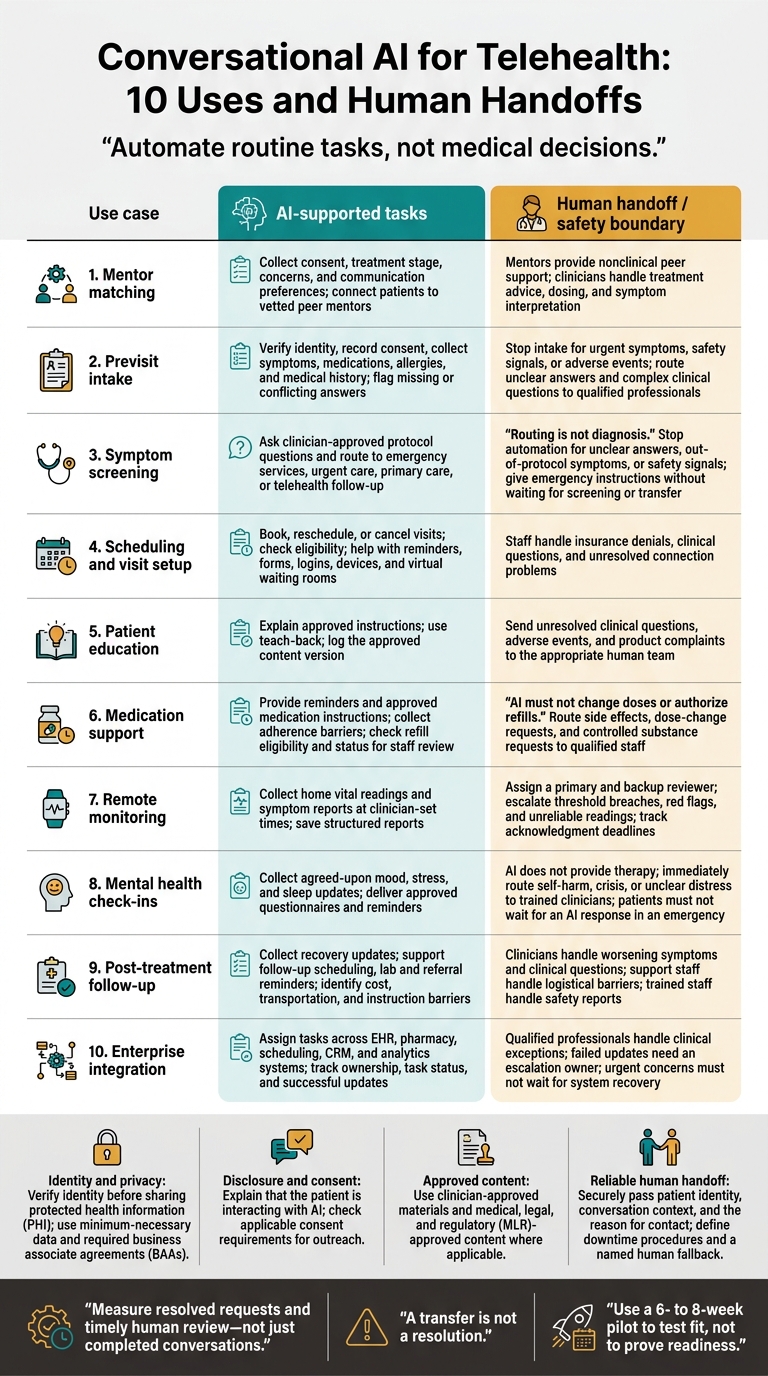
My starting rule for conversational AI in telehealth: automate routine tasks, not medical decisions. Start with reminders or intake, verify identity before sharing patient information, and set a clear path to human help.
I cover 10 uses for care teams, pharma brands, med-tech programs, and patient support teams:
- Mentor matching: Connect patients with people who offer nonclinical peer support.
- Previsit intake: Collect history and flag missing or conflicting answers.
- Symptom screening: Use clinician-approved protocols to route patients - not diagnose them.
- Scheduling and visit setup: Help patients book appointments and connect to virtual visits.
- Patient education: Explain approved care instructions and check understanding.
- Medication support: Handle reminders and request status without changing doses or authorizing refills.
- Remote monitoring: Collect readings and symptom reports for assigned reviewers.
- Mental health check-ins: Gather agreed-upon updates and route distress to trained staff.
- Post-treatment follow-up: Track recovery questions, referrals, and barriers to care.
- Enterprise integration: Assign tasks across systems and confirm that handoffs reach the right team.
Before launch, I’d check privacy controls, required agreements, outreach consent, approved content, and emergency procedures. A 6- to 8-week pilot can help test fit, but it does not prove readiness.
<u>Measure resolved requests and timely human review - not just completed conversations.</u> Faster service alone does not prove better adherence or health outcomes.
Conversational AI for Telehealth: 10 Uses and Human Handoffs
Chatbot: Empowering Medical Communication Using AI
sbb-itb-8f61039
Clinical Limits and Patient Safety
Use AI for administrative and routing tasks - not diagnosis or treatment decisions. Those decisions belong with licensed clinicians. AI can schedule visits, verify identity, collect intake details, and triage routine refill requests for non-controlled medications. Route controlled substance requests to licensed clinicians or pharmacists. Use approved materials for education and follow-up, and keep patient mentors and ambassadors focused on program guidance, not independent medical advice.
Verify identity before sharing PHI. Tell patients at the start that they’re interacting with AI and explain what data it collects. Document consent for AI voice outreach where required. Consent to treatment does not mean consent to every call. In February 2024, the FCC confirmed that TCPA restrictions on artificial or prerecorded voices apply to AI-generated voices.
Under HIPAA, protect data, recordings, and transcripts with encryption, signed business associate agreements (BAAs), secure logins, role-based access, and data minimization. Check state biometric privacy rules for voice data. Provide multilingual support and accent-aware speech recognition. Put these controls in place before expanding intake, education, and follow-up workflows.
Limit AI answers to prescribing information, medication guides, FAQs, and other content reviewed by medical, legal, and regulatory teams. Send clinical questions and uncertain responses to human reviewers. Keep audit logs and transcripts so teams can trace what patients asked, which content the system used, and where it routed each interaction.
Define escalation and downtime procedures before launch. Build human handoff into the telehealth workflow. Route adverse events, product complaints, safety signals, and complex clinical questions to trained personnel without waiting for AI to finish its script. Securely send the full conversation context to the receiving team so patients don’t have to repeat themselves. If the system fails or no reviewer is available, switch to a manual backup and a named human contact.
The next section looks at where conversational AI adds the most value in telehealth with these guardrails in place.
1. Patient Mentor Matching and Ambassador Support
Conversation Triggers and Tasks
With safety rules in place, AI can screen peer-support requests and connect patients with the right human resource.
When a patient asks for peer support, the intake workflow can collect consent, treatment stage, concerns, and a preferred communication channel: text, phone, or web chat. These details help direct peer-support questions to a mentor and clinical questions to a clinician. Sentiment can help prioritize outreach, but it should not determine clinical urgency.
Patients can get peer support faster without delaying clinician review.
System Connections and Setup
PatientPartner can link AI intake to brand-approved FAQs and education, then route patients to vetted mentors based on consent, treatment stage, and health goals. After matching, keep AI intake, mentor support, and clinical escalation separate.
Human Handoffs and Safety Limits
Peer support must stay nonclinical. Mentors share lived experience. Clinicians handle treatment advice, dosing, and symptom interpretation.
Define these roles before launch.
| Role | Responsibility and permitted interactions | Escalation triggers | Recorded data |
|---|---|---|---|
| Conversational AI | Collect intake details and provide approved content | Escalate adverse events, product complaints, medical questions, or frustration | Record consent, preferences, concerns, transcripts, and routing |
| Mentor or ambassador | Share lived experience and offer nonclinical encouragement | Escalate medical advice requests, emotional distress, or adverse events | Document interactions and referrals |
| Clinician | Assess symptoms and advise on treatment, dosing, and side effects | Escalate emergencies or needs beyond scope | Document clinical notes and care plans |
Route adverse events and product complaints to trained safety personnel within the required reporting timeline.
Workflow Results
Measure average time to mentor connection and the number of routine queries AI resolves as a proxy for administrative workload. Compare both measures before and after launch using the same reporting period.
Keep engagement separate from treatment starts, adherence, and clinical outcomes. A longer conversation alone does not establish better care.
2. Patient Intake and Previsit History
Conversation Triggers and Tasks
After peer support matching, conversational AI can move directly into previsit intake.
Before a telehealth visit, chat or voice intake can verify identity, record consent, and collect symptoms, medications, allergies, and medical history. Flag missing or conflicting answers for review.
System Connections and Setup
Send a structured summary to the EHR so the provider can review it. Before connecting the systems, sign a BAA, review security controls, and confirm that intake data reaches the EHR.
Human Handoffs and Safety Limits
Stop intake immediately if urgent symptoms, safety signals, or adverse events arise. Use clinician-approved triggers to connect patients with a human, passing along their identity, reason for contact, and relevant history. Send unclear answers, controlled-substance requests, and complex clinical questions to a qualified professional.
Workflow Results
Track intake completion and staff corrections. Audit flagged inconsistencies to check that the workflow improves without compromising safety.
Once intake is complete, the same workflow can support symptom screening and routing.
3. Protocol-Based Symptom Screening and Care Routing
Conversation Triggers and Tasks
After intake, conversational AI can use protocol-based screening to direct patients to the right level of care.
Use validated protocols to ask how long symptoms have lasted, whether they've changed, and whether warning signs are present. Then apply the protocol thresholds to route patients to emergency services, urgent care, primary care, or telehealth follow-up. Routing is not diagnosis.
This process depends on reliable system connections and thresholds reviewed by clinicians.
System Connections and Setup
Connect the patient record with approved care pathways so routing reflects the patient's current history and risk. Before launch, have medical, legal, and regulatory teams review screening questions and escalation triggers. Update them whenever guidance changes.
Human Handoffs and Safety Limits
Stop automation when answers are unclear, symptoms fall outside the protocol, or a safety signal appears. Escalate immediately to trained personnel. Give emergency instructions right away - don't wait for screening to finish or for a live transfer.
Workflow Results
Once routing is live, measure whether it improves speed and safety.
Keep audit trails and transcript logs showing what was said and how the system routed the patient. Connect these records with the EHR and downstream CRM or pharmacy systems.
Review routing accuracy and escalation speed. Track time to resolution, the human intervention rate, and patient-reported experience.
4. Appointment Scheduling and Virtual Visit Setup
Conversation Triggers and Tasks
Once routing is complete, AI can guide patients through booking and connection steps. This process often influences patient decision making regarding their care journey. Let patients book, reschedule, or cancel visits by voice or chat - even after hours. Confirm how they want to receive reminders, then guide them to required forms, insurance verification, and referral steps. Check eligibility before confirming the booking.
System Connections and Setup
After booking, use the same workflow to help patients prepare to connect. Link AI to the EHR or practice management system for live availability and booking updates, and to support teams for setup issues. Help patients log in, check their device and browser, and navigate the waiting room. Offer voice, SMS, or web chat based on their preferences.
Human Handoffs and Safety Limits
Collect only the data needed to schedule a visit or fix a setup issue. Verify identity before sharing PHI. Hand off insurance denials, clinical questions, and connection problems to staff, along with the conversation context. Require a BAA before connecting systems that handle patient data.
Workflow Results
Start with reminders and simple bookings. Compare completed bookings, successful connections, no-shows, booking time, and schedule-sync accuracy with the baseline. Track failed updates separately. A confirmed appointment doesn't mean a successful visit if the patient can't connect.
5. Patient Education and Care-Plan Guidance
Conversation Triggers and Tasks
After a telehealth visit, AI can explain clinician-approved visit summaries, instructions, and recovery steps in plain language. Use teach-back: ask patients to repeat key instructions in their own words, then use approved content to address any gaps in understanding.
System Connections and Setup
Connect guidance to the EHR and a version-controlled content library. Use only approved sources: clinician-approved education, prescribing information, medication guides, and MLR-reviewed materials for pharma programs. Log the content version used in each conversation to support audits and update control.
Human Handoffs and Safety Limits
If patients still have clinical questions after education, send them to the care team along with their conversation history. Route adverse events and product complaints, too. Treat confusion, worry, or repeated questions as a signal to clarify the guidance or escalate to the care team.
Workflow Results
Track teach-back completion, unresolved questions by topic, and follow-up completion in the EHR or CRM. Review recurring gaps in preparation and recovery instructions, then revise the clinician-approved content.
6. Medication Questions and Adherence Support
Conversation Triggers and Tasks
After receiving visit instructions, patients often have questions about dosing, refills, and side effects.
Start by verifying the patient’s identity. Then collect their medication list for staff review, reminder timing, and preferred follow-up channel. Answer missed-dose questions ONLY from approved medication instructions. Adherence check-ins should ask about barriers, such as cost or side effects - not just whether the patient took a dose.
System Connections and Setup
Check the pharmacy system or EHR for refill eligibility and status. Record the results for staff review. If the request can’t be resolved, send it to staff along with the patient’s conversation context.
Human Handoffs and Safety Limits
Send side-effect reports, dose-change requests, and controlled substance requests to qualified staff. AI must not change doses or authorize refills. When a patient reports side effects, immediately pass their identity, conversation context, and symptom details to the clinical team. Follow the program’s safety-reporting timelines.
Workflow Results
Use these workflows to resolve routine medication questions promptly while sending anything clinical to qualified staff. Track unresolved refill requests, barriers to adherence, and the time between a safety signal and handoff. Measure request resolution separately from adherence.
7. Remote Patient Monitoring and Symptom Reporting
Between visits, conversational AI can keep the care team informed and flag issues early.
Conversation Triggers and Tasks
Schedule AI check-ins at clinician-set times to collect symptoms and home vital readings. Conversational AI can also answer inbound calls or start check-ins to gather patient data.
System Connections and Setup
Save reports in structured EHR fields or a monitoring dashboard. Assign a primary reviewer and a backup before launch.
| Data type | Collection frequency | Escalation trigger | Responsible reviewer |
|---|---|---|---|
| Home vital readings | Daily or as prescribed | Clinician-approved threshold breach | Assigned nurse or physician |
| Symptom reports | Program-defined check-ins | Red-flag symptom or clinical threshold breach | Clinical care team |
| Side-effect reports | Daily or per symptom | Adverse event detection | Trained clinical safety personnel |
Human Handoffs and Safety Limits
Flag unreliable or incomplete readings for human review. Any red flag or urgent symptom should trigger an immediate, documented handoff to a clinician, including the patient's identity, history, and reason for contact.
Set acknowledgment deadlines based on urgency, and send unacknowledged alerts to the backup reviewer. Keep adverse-event reporting timelines separate from routine review schedules.
Workflow Results
Check whether reports are reviewed on time - not just collected. Track report completion, alert acknowledgment time, and on-time acknowledgment rate, along with side-effect detection and handoff speed.
8. Mental Health Check-Ins and Behavioral Support
Conversation Triggers and Tasks
In mental health workflows, conversational AI handles between-visit check-ins and routes responses to the right staff. It does not provide therapy.
Use check-ins patients have agreed to receive to gather mood, stress, and sleep updates. Send clinician-approved screening questionnaires and behavioral-health reminders. Any coping guidance must come from clinician-reviewed content - not personalized therapy or treatment decisions.
System Connections and Setup
Verify the patient’s identity before discussing behavioral-health records. Record questionnaire responses and distress flags for the assigned behavioral-health reviewer.
Human Handoffs and Safety Limits
Clearly state that the AI is not a therapist, crisis line, or emergency service. Sentiment analysis can flag distress, but it can miss indirect language and cannot replace clinician judgment.
Display U.S. crisis instructions clearly: Call or text 988 for crisis support. Call 911 for immediate danger. Patients should not wait for an AI response or a care-team callback in an emergency.
Immediately route any response that suggests self-harm, crisis, or unclear distress to a trained clinician.
Workflow Results
Track completed check-ins, documented handoffs, and missed distress signals. Review false escalations with behavioral-health staff to refine routing.
9. Post-Treatment Follow-Up and Care Transitions
Conversation Triggers and Tasks
After a visit, conversational AI can help patients stay on track with recovery and the next steps in care. Use it for recovery check-ins, follow-up scheduling, lab and referral reminders, and support when starting a new medication. Conversations can help identify barriers, such as cost, transportation, or confusing instructions. Send unclear issues and clinical questions to a human for review.
System Connections and Setup
Connect AI to the EHR, CRM, and pharmacy management system to check appointment and refill status and log unresolved issues. Use the patient’s documented care plan to guide follow-up, and include the patient’s identity, conversation history, and exact issue in every handoff. With a shared record, patients don’t have to start over each time another team member steps in.
Human Handoffs and Safety Limits
Send worsening symptoms and all clinical questions to clinicians - not patient mentors. Navigators or support staff can handle cost and transportation issues. Route suspected adverse events and product complaints to trained staff through the required safety-reporting workflow. Keep logistical support separate from clinical escalation.
Workflow Results
Track resolution rate, average time to resolution, and unresolved follow-up items. A transfer is not a resolution. Record whether the patient secured transportation, settled a cost concern, or received clear instructions. Save the outcome in the patient record so the next team member can act on it.
10. Enterprise Telehealth Workflow Integration
Conversation Triggers and Tasks
At enterprise scale, conversational AI needs to route work across teams and systems, not just answer patients.
Turn refill requests, appointment changes, billing questions, safety reports, and signs of confusion or frustration into assigned tasks. Route them through intake, scheduling, follow-up, and safety workflows. Use shared queues with clear ownership and task status tracking. Keep clinical review separate from administrative follow-up.
System Connections and Setup
Connect EHR, pharmacy management, scheduling, CRM, and analytics systems through APIs and structured data. Set rules for data routing and permissions across systems.
Verify patient identity before showing protected health information. Confirm required business associate agreements before deployment, and check consent requirements for outbound AI calls. Test that each update reaches the intended record - not just the chatbot.
Human Handoffs and Safety Limits
Set routing rules for controlled substance requests and clinical exceptions, and assign them to pharmacists or providers. Give the reviewer the patient’s identity, the reason for the interaction, and the conversation history.
Use immutable audit trails across systems to check what the AI said, what it recorded, and whether safety triggers worked. Define downtime procedures before launch. Failed updates need an assigned escalation path, and urgent concerns must not wait for an integration to recover.
Workflow Results
Track task completion, time to first response, completed handoffs, unresolved safety alerts, and sync success. Review these measures by workflow to check reliability across teams and systems. Strong scheduling performance should not hide delayed clinical reviews.
Start with predictable tasks, such as appointment reminders or refill requests. Then use quality checks and audit records to decide whether to expand. Reliability, not volume, should determine expansion.
Workflow Benefits, Limits, and Safeguards
After reviewing the use cases, set the controls that determine whether conversational AI can scale safely.
Faster workflows do not prove better outcomes. Track request resolution, booking speed, and staff hours saved separately from clinical outcomes, such as medication adherence and symptom improvement. Claims about health outcomes need peer-reviewed evidence that matches the patient population and intended use.
Use the guardrails below to decide which tasks can remain automated and which need human review. Apply this rollout checklist to intake, routing, scheduling, education, adherence, monitoring, and follow-up.
| Area | Opportunity | Limitation | Required control |
|---|---|---|---|
| Efficiency | Less repetitive administrative work | Complex legacy EHR integration | Measure staff hours, including corrections and escalations. |
| Access | After-hours and multilingual support | Digital literacy and connectivity barriers | Offer SMS, voice, email, and a human fallback. |
| Personalization | Communication based on patient preferences | Impersonal interactions | Let patients state their communication preferences. |
| Scale | More simultaneous conversations | Limited staffing capacity | Match conversation volume to staffing. |
| Privacy | Controlled information sharing | Added regulatory risk from voice and biometric data | Assess voice and biometric requirements. |
| Bias | Support for more languages and accents | Uneven performance across groups | Compare performance across representative patient groups. |
| Hallucinations | Consistent, approved information | Unsupported or incorrect answers | Restrict responses to approved sources. |
| Clinical safety | Earlier identification of safety signals | Human review bottlenecks for safety escalation | Monitor escalation delays. |
For pharma and med-tech programs, keep responses within MLR-approved content and hand off anything outside that scope.
Use minimum-necessary data, confirm HIPAA controls and a signed BAA, and handle adverse-event reporting separately from privacy compliance.
Test these exact workflows in a limited rollout before expanding deployment. Use a 6- to 8-week pilot to test fit, not to prove readiness. Include patients with different languages, accents, and digital skills. Review unsuccessful interactions - not just completed ones.
Conclusion
These 10 use cases span intake, routing, education, monitoring, and follow-up. AI supports the workflow; it does not make clinical decisions. Enterprise workflows need clear ownership, logging, and a handoff to a person.
For pharma and med-tech teams, AI can handle routine conversations. PatientPartner connects people considering treatment with experienced mentors for peer support - not clinical advice.
Rollout depends on clear responsibility and measurement. Assign one owner to each workflow and escalation, then track resolution rates, time to resolution, and patient sentiment. Securely carry relevant conversation history forward so patients don’t have to repeat themselves. Tie scope, approved content, and privacy controls to each role, with human review when needed. Completed conversations don’t prove better adherence or outcomes, and automation is not medical judgment.
FAQs
Which telehealth tasks should we automate first?
Start with high-volume, repetitive tasks that don’t need clinical judgment: scheduling appointments, sending confirmations and reminders, collecting structured patient intake information, and answering routine questions about benefits, eligibility, and prescription refills.
Once those workflows are stable, move into claims management or referrals. Keep a hybrid model: AI handles routine interactions, while human mentors or clinical staff offer emotional support and take on high-stakes situations or complex decisions.
How can we test AI handoffs before launch?
Set clear clinical escalation pathways before launch so urgent concerns - including adverse events or controlled substance inquiries - receive immediate, documented handoffs to a human. Test pilots against human baselines, tracking how many calls are resolved without human intervention and how accurately calls are handed off.
Before launch, complete a risk analysis to check security controls, audit logs, and compliance requirements. Confirm that sensitive or urgent patient needs bypass routine automation.
How do we know our pilot is ready to scale?
Your pilot is ready to scale once you’ve validated your data model, met your preset benchmarks for retention, titration speed, and time to initiation, and maintained steady performance for several weeks. That includes high resolution rates for routine tasks and patient engagement typically above 95%.
Before you expand, standardize your operating model, centralize consent and eligibility rules, and confirm regulatory compliance in every planned region and therapy area.