


HIPAA Cloud Storage Problems and Fixes for SaaS

Key Takeaways
Author


A cloud provider’s HIPAA claims don’t make your SaaS compliant. I start by mapping where electronic protected health information (ePHI) goes, who can access it, and which vendors handle it. If records are exposed, block public access, revoke compromised credentials, and preserve logs first.
Then I check five common storage problems:
- Weak access controls: Limit permissions by task, use MFA, and test that former staff lose access.
- Missing BAAs: Confirm signed business associate agreements cover storage, backups, support, and recovery services.
- Encryption and monitoring gaps: Protect every data copy, restrict key access, and test alerts.
- Untested backups: Restore records and patient-support workflows, then measure downtime and data loss against your targets.
- Untracked files: Find stray copies, assign owners, and verify retention and deletion rules.
My rule: <u>give every fix an owner, a deadline, and a test</u>. Keep required HIPAA documentation for six years; medical-record retention follows separate rules. The goal is proof that controls work - not just a checked box.
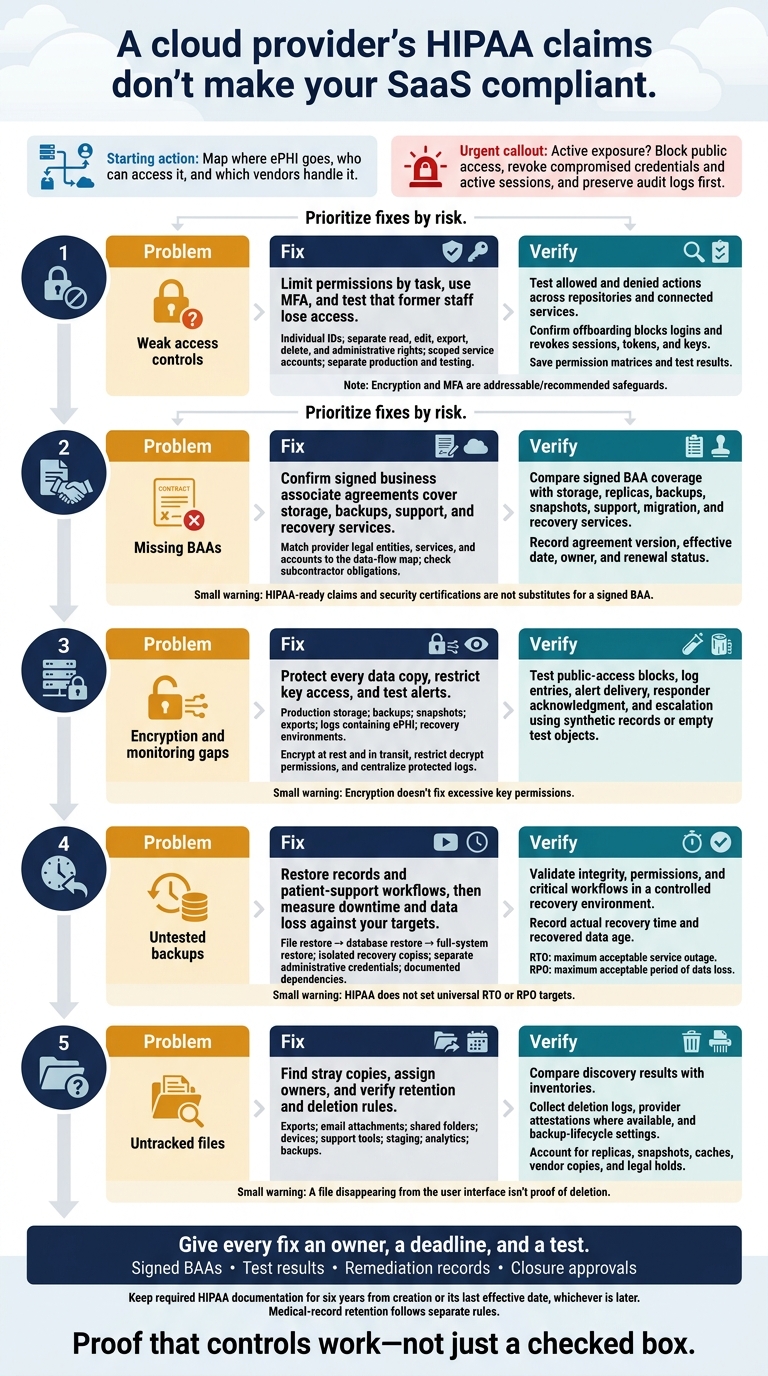
HIPAA Cloud Storage: 5 Problems, Fixes, and Tests
Is the Cloud REALLY HIPAA Compliant? - 10 Critical Questions Answered!
sbb-itb-8f61039
Problem: Weak Access Controls Expose Patient Records
Once you’ve mapped storage paths, lock down who can access each one.
Shared accounts make it hard to trace actions to a person. Broad permissions, stale credentials, and production data in testing mean one mistake or stolen login can expose more records than necessary. Use role-based access and test it regularly.
Fix: Limit Access by Role and Purpose
HIPAA requires unique IDs, emergency access, and audit controls. Automatic logoff is an addressable specification: assess whether it is reasonable and appropriate. If you decide not to implement it, document that decision and any alternative. MFA and just-in-time access are recommended safeguards. Use MFA for privileged and remote access, preferably with phishing-resistant methods where practical.
Set permissions by storage task, not just job title. Keep read, edit, export, delete, and administrative rights separate. Give each service account an owner, a narrow scope, and short-lived credentials. Allow interactive login only when needed.
Keep production storage, keys, and credentials separate from testing. Use synthetic or verified de-identified data. Any exception for production data needs a documented purpose, a limited dataset, restricted access, and a deletion deadline. Set emergency access rules, send alerts when that access is used, and review each use afterward.
| Access failure | Control | Accountable owner | Verification record |
|---|---|---|---|
| Shared logins | Individual IDs and named administrator accounts | IAM lead | Account inventory and audit events tied to individuals |
| Broad permissions | Task-based roles and time-limited elevation | Data owner | Permission matrix and approval record |
| Stale credentials | Disable identities; revoke sessions, tokens, and keys | IT/IAM, triggered by HR | Offboarding checklist and revocation test |
| Unprotected privileged or remote access | MFA and restricted access paths | Security lead | Authentication policy and sign-in test |
| Overpowered service accounts | Scoped permissions and credential rotation | Platform owner | Service inventory, policy export, and rotation record |
| Production ePHI in testing | Separate environments and controlled datasets | Engineering and privacy leads | Dataset scan, access settings, and deletion evidence |
Then test whether those limits hold.
Verify: Test Permissions and Access Removal
For each repository, record who has access, what they can do, why they need it, and when it was reviewed. Check APIs, backups, support tools, deployment systems, and vendor accounts - not just the application interface. Confirm that permitted actions succeed and that read, write, export, delete, sharing, and administrative actions fail when permission is absent. Review high-risk permissions quarterly, and sooner after role changes, incidents, or new integrations.
Test offboarding with a controlled account. Confirm that disabling it blocks new logins, invalidates active sessions and refresh tokens, revokes API keys, removes group-based access, and prevents access through connected service accounts. Retire or rotate affected service credentials without disabling unrelated integrations.
Check that sensitive actions produce searchable logs showing the identity, action, repository, time, and outcome. Protect those logs from alteration. Save expected versus observed results, test dates, evidence, and remediation owners.
Problem: Missing BAAs Leave Vendor Gaps
After checking access controls, confirm that every cloud vendor involved in ePHI storage, backup, support, or recovery is covered by a contract. Any cloud service that creates, receives, maintains, or transmits ePHI needs a signed BAA - even if it cannot decrypt the data. Security certifications and HIPAA-ready claims aren't substitutes. Backup, support, and recovery services are common places for coverage gaps.
Fix: Document BAAs and Vendor Duties
For each provider, record its legal entity, BAA status, covered services and accounts, data locations, and the duties assigned to both the customer and vendor. Require written HIPAA obligations for subcontractors that handle ePHI. Use this checklist to distinguish required BAA terms from optional safeguards.
| Owner | Required BAA or compliance item | Optional safeguard |
|---|---|---|
| Legal | Parties, permitted uses and disclosures, safeguards, incident and breach duties, subcontractor obligations, amendment and termination terms | Liability allocation, audit rights, insurance, governing law, notice procedures |
| Privacy/compliance | ePHI categories, HIPAA roles, minimum necessary use, regulatory cooperation, documentation duties | Annual BAA review, vendor risk rating, evidence-retention schedule |
| Security | Incident and breach reporting contacts, safeguards, access and encryption responsibilities | Alert deadlines, log retention, incident exercises, vulnerability notifications |
| Engineering or IT | Covered storage, backup, support, recovery, and migration services; locations and environments | Recovery objectives, restore tests, export format, key management, deletion verification |
Assign owners for detection, investigation, containment, documentation, and reporting. Spell out the facts each owner must provide. A business associate must notify the covered entity of a breach of unsecured PHI without unreasonable delay and within 60 days of discovery. Set shorter contractual escalation deadlines, and distinguish security-incident reporting from breach notification.
Verify: Check BAA Coverage for Each Service
Use the data-flow map from the previous step to identify every service that needs coverage. Before onboarding or renewal, compare that map and the cloud inventory with the signed BAA. Check storage, replicas, backups, snapshots, support access, migration tools, and recovery environments. Confirm the provider's legal entity and the accounts or products covered. Record the agreement's effective date, version, owner, and renewal status. HIPAA marketing and security documents aren't proof of BAA coverage.
At offboarding, disable vendor and integration credentials, revoke support and administrative access, and rotate keys or tokens. Export required records, verify cutover, and document deletion or permitted retention. Record any copies left in backups, logs, caches, test environments, and subcontractor systems. For immutable backups, specify retention periods, access limits, encryption, and proof of final destruction.
Problem: Encryption and Monitoring Gaps Expose Data
After checking vendor coverage, review encryption, logging, and alerting across every storage layer.
An encrypted database doesn’t protect every copy of its data. Public storage, unprotected exports and snapshots, broad decrypt permissions, missing logs, and alerts nobody monitors can expose ePHI across copies, shares, and recovery paths.
HIPAA requires audit controls and transmission security. Encryption and decryption are addressable specifications. Assess whether encryption is reasonable and appropriate, implement it when applicable, or document why an equivalent alternative is used when appropriate. Keep the assessment and the reasoning behind the decision.
Start with the data layer, then check the keys and alerts.
Fix: Encrypt Data and Monitor Access
Encrypt ePHI in transit with properly configured TLS and at rest wherever it resides. Document who owns the keys, limit decrypt permissions to approved roles and workloads, and separate key administration from data access where practical. Review key grants and cross-account access.
Encryption doesn’t fix excessive key permissions. Use public-access blocks, separate keys where practical, and tamper-resistant centralized logging as risk-based safeguards.
| Data location | Encryption and access coverage | Monitoring to verify |
|---|---|---|
| Production databases and object storage | Encryption at rest, TLS in transit, restricted service and decrypt access | Reads, writes, deletes, and public-access changes |
| Backups | Encrypted copies and transfers; separate recovery permissions | Access, restores, deletion, and failed jobs |
| Snapshots | Inherited or explicit encryption; restricted sharing | Creation, sharing, copying, and deletion |
| Exports and reports | Encrypted storage and transfer; approved destinations and expiration rules | Export generation, bulk downloads, and destination changes |
| Logs containing ePHI | Encrypted storage and transfer; limited reader and administrator access | Searches, deletion, alteration, and log gaps |
| Recovery environments | Encryption, network restrictions, and restricted key use | Recovery access, permission changes, and cleanup |
Log the actor, timestamp, time zone, action, resource, result, source, and request ID. Leave out unnecessary ePHI, keys, and passwords.
Route high-priority public-access changes, unusual exports, key-policy changes, and disabled logging to a monitored on-call channel. Assign a responder and define an acknowledgment deadline, escalation path, and response action. Preserve acknowledgment and incident records.
Verify: Test Public Access Blocks and Alerts
Test controls where the data actually lives: storage, snapshots, exports, logs, and recovery systems.
Use synthetic records or empty test objects to check anonymous reads, writes, and listing from outside the trusted network. Inspect effective permissions on databases, object storage, snapshots, export links, and recovery repositories.
In an isolated test environment, attempt a public-permission change and confirm that guardrails block or reverse it. Generate a test export and a storage-key policy event. Then verify the central log entry, alert delivery, responder acknowledgment, and after-hours escalation. Restore permissions, record the results, and assign remediation owners.
Review key grants after changes and at documented, risk-based intervals. Protect logs from alteration through restricted access and, where feasible, append-only or immutable storage.
HIPAA does not set a single technical log-retention period. Set retention based on risk analysis and applicable federal, state, contractual, and organizational requirements. Test log retrieval and monitor for gaps.
Problem: Untested Backups Put Recovery at Risk
Once encryption and monitoring are in place, prove that backups can restore the service. Backup copies fall within the same HIPAA storage scope as production data.
A completed backup job shows that a copy was made. It does not prove that the copy is complete, uncorrupted, usable, or restorable within the required time. Attackers who compromise production credentials may also be able to delete or encrypt backups. Without recovery targets and a runbook, teams cannot tell whether restoration will meet service needs. HHS recommends periodic test restorations.
Fix: Set Recovery Targets and Test Restores
For each critical service, define a recovery time objective (RTO) - the maximum acceptable service outage - and a recovery point objective (RPO) - the maximum acceptable period of data loss. Set both using patient-support needs and documented risk analysis, not backup-job speed. HIPAA does not set universal targets. Its contingency-plan requirements cover data backup, disaster recovery, emergency-mode operations, and testing and revision procedures.
Keep encrypted recovery copies offline or isolated, with separate admin credentials and restricted deletion rights. Document the restore order, owners, vendor contacts, and emergency access to keys, secrets, identity services, and infrastructure configuration. Make sure the runbook remains accessible during an outage. Missing dependencies can stop SaaS recovery even when the data restores successfully.
Test each recovery layer - not just whether a backup job finished. Follow a documented, risk-based schedule, and test after the changes listed below.
| Restore test | What to restore and validate | Required records | Risk-based testing triggers |
|---|---|---|---|
| File restore | Restore sample documents, attachments, metadata, and version history into an isolated location. Check readability, completeness, timestamps, and access controls. | Test date, backup identifier, file types, sample selection, integrity results, elapsed time, access-control results, defects, and corrective owner | New storage provider, retention-policy or encryption change, unusual backup failure, or suspected deletion |
| Database restore | Restore a representative database or point-in-time copy. Check schema, indexes, relationships, transactions, timestamps, queries, and ePHI integrity. | Database and recovery-point identifiers, dependencies, RTO/RPO results, validation queries, data-loss measurement, approvals, and remediation deadline | Database-engine upgrade, migration, replication change, major schema release, or RPO change |
| Full-system restore | Rebuild the app and required infrastructure in a segregated environment, including identity, keys, networking, configuration, integrations, and monitoring. Run critical workflows end to end. | Runbook version, dependency sequence, personnel, logs, recovery times, failed steps, security checks, business sign-off, and lessons learned | Major architecture or cloud-region change, ransomware scenario, material vendor change, critical service release, or failed component test |
Validate the entire restore path, not just the backup artifact.
Verify: Restore Records and Critical Services
Restore into a controlled, segregated environment. Use synthetic or de-identified data when it meets the test’s needs. If real ePHI is required, restrict access, encrypt it, log activity, isolate the network, limit personnel, and securely dispose of the data after testing.
Check record counts, relationships, timestamps, and file integrity. Confirm that staff with permission can complete critical workflows and that users without permission remain blocked.
Measure actual recovery time against the RTO and recovered data age against the RPO. Record dependency delays, permission failures, and integrity defects. Give each corrective action an owner, deadline, and retest date. Repeat testing after material changes to storage, databases, identity, keys, or critical integrations. Record whether recovery met downtime limits, data-loss limits, and critical workflow needs.
Problem: File Sprawl Leaves Patient Data Untracked
Backup controls don't cover every copy of patient data. File sprawl means uncontrolled ePHI copies spread across exports, email attachments, shared folders, local devices, support tools, staging systems, and analytics environments.
These copies often fall outside the systems teams monitor most closely. When locations aren't tracked, teams can't be sure who has access, which retention rules apply, or whether deletion reaches every copy. Untracked copies also slow incident response because affected records are harder to identify. Safeguards must protect PHI for as long as it is maintained, including during disposal.
Fix: Inventory Data and Define Retention Rules
Inventory every place ePHI can be copied or kept. For each location, assign an accountable owner and document its approved purpose, permitted data, and sharing method. Prohibit personal email and public sharing links for ePHI.
Use synthetic or properly de-identified test data - removing names alone isn't enough. Give exported files an expiration date tied to the task, rather than letting them sit indefinitely in a download folder.
| Location | Owner | Access | BAA | Retention | Backup | Disposal |
|---|---|---|---|---|---|---|
| Production database | Application owner | Role-based; approved production-support workflow | Vendor/platform BAA confirmed | Approved record schedule and applicable state law | Encrypted backups; expiration and restore testing | Approved deletion workflow; legal-hold check |
| Temporary export folder | Export requester | Named users; time-limited link; no public sharing | Storage provider’s BAA covers ePHI | Automatic task-based expiration | Backup behavior checked before use | Automated expiration and deletion confirmation |
| Support platform | Support operations owner | Minimum necessary access | BAA executed; vendor deletion terms reviewed | Delete tickets and attachments after the support period unless a hold applies | Vendor retention and backup terms | Vendor deletion request or contractual workflow |
| Analytics workspace | Analytics lead | Separate roles; masked or de-identified datasets preferred | BAA covers service and relevant subprocessors | Short-lived raw data; aggregate outputs kept only as needed | Encrypted snapshots with defined expiration | Scheduled purge, snapshot expiration, and deletion verification |
| Employee or managed device | Department owner; IT custodian | Managed-device controls; no personal storage | Not applicable or separately assessed | Minimum necessary working period | Endpoint backup behavior | Remote wipe, secure erase, or media destruction |
| Cloud backup or archive | Infrastructure owner | Restricted access | BAA and subcontractor coverage confirmed | Defined lifecycle; legal holds override expiration | Immutable or controlled copies | Deletion or expiration proof |
Once you've mapped the copies, set retention rules for each location. Medical-record retention and HIPAA documentation retention are separate requirements. HIPAA doesn't set a universal medical-record retention period; follow applicable state law. Keep required HIPAA documentation for six years from creation or its last effective date, whichever is later.
Have legal and compliance approve separate schedules for authoritative records, working copies, and backups. Include a legal-hold field in the inventory.
Verify: Find Untracked Copies and Check Disposal
Use approved discovery tools to inspect cloud storage, email, endpoints, support systems, and analytics workspaces. Check unmanaged locations through authorized device reviews and staff interviews, then compare the results with application, identity, and vendor inventories. Scans can miss screenshots and encrypted archives.
Collect deletion logs, provider attestations, backup-lifecycle settings, access reports, and exception records. Restrict unknown repositories, assign an owner and deadline, and check preservation obligations before removing duplicates.
A file disappearing from the user interface isn't proof of deletion. Verify deletion through logs, vendor attestations where available, and backup-lifecycle settings. Account for replicas, snapshots, caches, and vendor-held copies.
Document legal-hold owners and release procedures. If backups can't be deleted immediately, record their final expiration date and restrict restoration of expired data. Vendor termination terms should address return or destruction where feasible. Media disposal must prevent retrieval.
Conclusion: Prioritize Fixes and Keep Records
After the control checks above, contain active exposure first across access, vendor, backup, and file-copy paths. Block public access, revoke compromised credentials and active sessions, and preserve audit logs. Pause new uploads, exports, and automated ePHI transfers to vendors without signed BAAs until contracts and reviews are complete.
Then prioritize the five fixes by risk: tighten role-based access, close BAA gaps, address encryption and monitoring gaps, test backup recovery, and put unmanaged copies under inventory and retention controls.
Give each corrective action one owner and one deadline. Keep signed BAAs, test results, and closure approvals. Before closing a finding, require test evidence - not just a checked box.
Revisit the risk analysis after new integrations, storage changes, or incidents. HIPAA compliance is the organization’s responsibility, not the storage product’s. Private certifications don’t replace HIPAA obligations.
FAQs
How can we prioritize HIPAA storage fixes with limited resources?
Roll out changes in phases, starting with the highest risks. Inventory your data and map how PHI moves through your systems. This helps you pinpoint storage locations and vendors that need a Business Associate Agreement (BAA). For primary databases and object storage, prioritize AES-256 encryption and strict role-based access controls.
Use cloud-native services to automate key management and rotation. Pilot high-risk workflows to check that controls work before scaling. Centralize immutable audit logs to support compliance while keeping routine maintenance to a minimum.
What should we do if a vendor refuses a BAA?
If a vendor refuses to sign a Business Associate Agreement (BAA), stop the technical evaluation immediately. Sending protected health information (PHI) through a service without a signed BAA violates HIPAA.
Do not move forward with any integration involving PHI unless a standard or custom BAA is signed. If no BAA is available, either document a compensating control - such as redacting PHI before it leaves your environment - or choose another vendor.
How can we prevent deleted ePHI from returning during a restore?
Keep backup and recovery processes in step with your data lifecycle management. Test restores regularly to verify that the restored environment matches your current storage state and preserves production access controls, encryption, and segmentation.
Keep detailed deletion audit logs to track record status. Set backup retention policies to match your data destruction requirements.