


Third-Party API Compliance: Audit Logging Explained

Key Takeaways
Author


If a third-party API touches ePHI, I need more than logs turned on. I need logs that I can review, trace, keep for at least 6 years, and use to show who did what, when, where, and what happened next.
Here’s the short version: HIPAA expects two things at the same time - record system activity and review it on a regular basis. That applies not just to my team, but also to API vendors, business associates, and subcontractors in the chain. If one link fails, the audit trail gets weak fast.
Before I go deeper, these are the main points I’d keep in view:
- Audit logging is required for systems that contain or use ePHI.
- Log review is also required. Keeping logs and never checking them is not enough.
- I should log who, what, when, where, and outcome for each API event tied to patient data.
- I should avoid putting full clinical data into logs and use IDs instead.
- I should track failed login attempts, access changes, and emergency or “break-glass” access.
- I should keep logs in a way that limits edits or deletion and protect them in transit and at rest.
- I should set retention for at least 6 years, and longer if contracts or state rules say so.
- I should keep proof of review, not just the raw log files.
One point matters more than most: an audit log is only useful if I can follow one request across every system and vendor involved. If IDs, timestamps, or event names don’t line up, the record becomes hard to trust.
A few facts stand out:
- HIPAA points to audit controls at 45 CFR § 164.312(b)
- HIPAA also calls for regular review at 45 CFR § 164.308(a)(1)(ii)(D)
- Retention should be 6+ years
- Review timing can be daily, weekly, or monthly, based on risk
Here’s a quick snapshot:
| Area | What I should do |
|---|---|
| Logging | Record access and system activity tied to ePHI |
| Identity | Tie each event to a user or system ID |
| Review | Check logs on a set schedule based on risk |
| Security | Protect logs from changes and limit access |
| Retention | Keep records for at least 6 years |
| Evidence | Save review notes, incidents, and access change records |
So if I want a HIPAA-ready setup for third-party APIs, I’m not just storing events. I’m building a clear record of access, review, and follow-up that I can show later if asked.
How We Made ChatGPT HIPAA Compliant
sbb-itb-8f61039
HIPAA audit control requirements for third-party APIs
That baseline leads straight to the Security Rule's audit-control requirement. Under 45 CFR § 164.312(b), covered entities and business associates must:
"Implement hardware, software, and/or procedural mechanisms that record and examine activity in information systems that contain or use electronic protected health information."
The key point is simple: HIPAA expects both recording and review. If a third-party API creates, receives, maintains, or transmits ePHI, just turning on logs doesn't cut it. Audit controls make more sense when they sit alongside access control, integrity, authentication, and transmission security.
The review piece shows up again in 45 CFR § 164.308(a)(1)(ii)(D), which calls for regular review of records of information system activity, such as audit logs, access reports, and security incident tracking reports. Put those two rules together, and audit logging becomes part tech setup, part written process.
That means the BAA should spell out the basics up front: log detail, review frequency, and report format.
Where audit logging fits within HIPAA technical safeguards
These safeguards connect directly to API traceability:
| HIPAA Technical Safeguard | Regulatory Citation | Requirement for APIs |
|---|---|---|
| Audit Controls | 45 CFR § 164.312(b) | Record and examine activity in systems using ePHI |
| Access Control | 45 CFR § 164.312(a) | Use unique user and system IDs to trace API actions |
| Integrity | 45 CFR § 164.312(c) | Protect ePHI from improper alteration or destruction |
| Authentication | 45 CFR § 164.312(d) | Verify the identity of persons or entities seeking access |
| Transmission Security | 45 CFR § 164.312(e) | Guard against unauthorized access during transmission |
For API compliance, the link to unique user identification matters a lot. If you can't tie an API action to a specific user or system credential, it gets much harder to keep a clean record of who accessed what data and when.
Common compliance gaps in API logging programs
One of the most common problems is pretty basic: teams collect logs, then rarely review them. HIPAA doesn't stop at log collection. It requires procedures for regular review of system activity records, including audit logs, access reports, and security incident tracking reports.
Another weak spot is failing to connect API activity to unique identifiers. When that link is missing, the audit trail becomes thinner and far less useful during a compliance review.
Teams also tend to miss log-in monitoring. Tracking log-in attempts and flagging discrepancies can help spot brute-force activity or other unauthorized access attempts.
And then there's log integrity. HIPAA's integrity standard requires mechanisms to help protect ePHI from improper alteration or destruction. The same idea applies to the records used to audit access to that ePHI.
What a HIPAA-ready third-party API audit log should capture
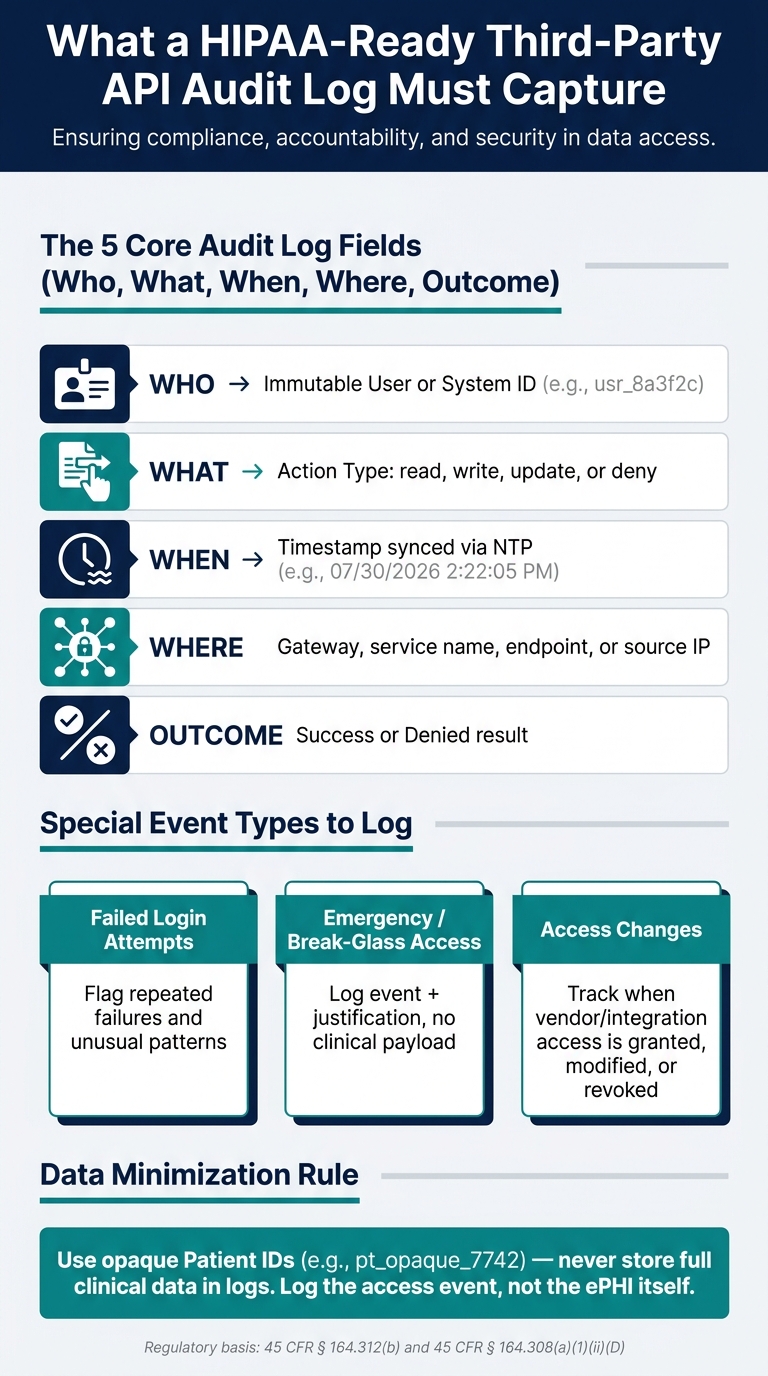
HIPAA Audit Logging Requirements for Third-Party APIs: Key Controls at a Glance
Operational logs show how systems are running. HIPAA audit logs do a different job: they help you rebuild ePHI access across third-party APIs.
That means the log should tell you who accessed patient data, what they touched, when it happened, where the request came from or moved through, and whether it worked. With third-party APIs in the mix, every request needs a clear trail across vendors and services.
Audit trails record internal system activity. Accounting, by contrast, deals with certain external disclosures.
Required event details: who, what, when, where, and outcome
At a minimum, a useful audit event needs identity, context, timing, location, and result.
Use an immutable user or system ID, not a display name. Log the action type, such as read, write, update, or deny. Add a timestamp, and sync clocks with NTP so the timeline holds up under review. Log the request purpose or workflow category too, such as treatment, operations, support, or emergency response.
| Field | Example Value | Why It Matters |
|---|---|---|
| User/System ID | usr_8a3f2c |
Ties the action to a specific identity |
| Patient ID | pt_opaque_7742 |
Identifies the record without storing the clinical payload |
| Timestamp | 07/30/2026 2:22:05 PM |
Supports review and reconstruction |
| Action | read |
Documents the system activity |
| Where | gateway, service name, endpoint, or source IP | Shows the access path |
| Outcome | denied |
Shows whether access succeeded or failed |
Purpose of use, emergency access, and data minimization
Break-glass access needs its own record. Log the event, include the justification, and avoid storing clinical payloads in the log itself. Instead, use opaque patient and resource IDs.
That way, the log stays useful without storing ePHI twice. And if one API layer logs these fields one way while another vendor logs them another way, the trail starts to fall apart. Consistency across every API layer is what makes the log usable.
How to design and implement audit logging for third-party healthcare APIs
Once you know what to log, the next step is figuring out where and how to capture it. That choice matters more than it may seem. Your setup determines whether an audit trail is easy to review, easy to explain, and strong enough to stand up during an investigation.
Architecture patterns: gateway logging, middleware, and centralized audit trails
Three common patterns cover most healthcare API setups.
API gateway logging records request activity at the edge of the API environment. It can log user ID, IP address, action, resource, and timestamp.
Application middleware fills in the gaps. When a route touches ePHI, middleware can add context like patient identification, user identification, and a description of the action taken. In practice, this is where you add patient context, action type, and workflow details the gateway can’t see.
Centralized audit trails pull gateway and middleware events into one queryable store. That makes cross-service review possible and helps teams avoid silos that make it hard to rebuild a full access timeline. The central store becomes the main record for review and investigation.
Use risk analysis to decide how much detail each layer should record.
Once capture is standardized, the next step is making sure the logs can’t be quietly changed.
Storage, retention, and integrity controls
Store logs in append-only or WORM storage. Protect them with hashes or digital signatures, and limit delete or edit rights.
Encrypt logs in transit and at rest. If logs move across open networks, apply integrity controls during transfer.
Set retention to at least six years, then extend it if contracts or state law require more time. It also helps to set lifecycle policies in the storage system so retention is enforced automatically instead of depending on manual steps.
Platform and storage option comparison tables
Pick the platform that gives you the right balance of immutability, query speed, and day-to-day operational load.
| Platform | Captured Fields | Immutability Options | Retention Controls | Implementation |
|---|---|---|---|---|
| AWS/Azure/GCP audit logs | User ID, IP, action, resource, timestamp | Object Lock / WORM options | Configurable lifecycle policies | Platform-native; high automation |
| FHIR AuditEvent (ASTM E2147-18) | Patient ID, user ID, action, date/time, disclosure description | Requires external integrity controls such as hashing | Policy-driven; typically a six-year baseline | Application-level; requires resource mapping |
| Storage Option | Query Performance | PHI exposure risk | Operational Overhead | Compliance Fit |
|---|---|---|---|---|
| Application Database | High | High (logs stored with data) | Low | Low (risk of alteration) |
| Dedicated Log Store | Medium | Medium | Medium (requires strict ACLs) | Medium |
| SIEM / WORM Archive | Low to Medium | Low (isolated environment) | High | High (supports immutability and integrity requirements) |
The next section explains how teams review these logs and turn them into audit evidence.
Monitoring, review, and proof of compliance
Collecting logs is only part of the job. Teams also need to review them and keep proof that those reviews happened. After that, the next step is simple: decide how often to review them.
Review cadences, alerts, and API-specific monitoring rules
Review frequency should match the risk analysis. High-risk integrations may call for daily automated review, while lower-risk systems may be reviewed weekly or monthly. It also helps to tag alerts and reviews by API, vendor, and environment so teams can sort issues faster and see where problems are coming from.
Set real-time or near real-time alerts for repeated failed login attempts and unusual login patterns. Emergency access events should also be logged. Periodic evaluations can help confirm that the review process still matches the current risk profile.
Those review records then become part of the audit evidence set.
Evidence package for audits and executive oversight
Keep logs, review records, and incident files. These artifacts help show that monitoring took place.
| Evidence Type | Compliance Question Answered | Regulatory Reference |
|---|---|---|
| Audit Logs | Who accessed patient data and what actions did they take? | 45 CFR § 164.312(b) / 45 CFR § 164.308(a)(1)(ii)(D) |
| Review Records | Is the organization actually reviewing the data it collects? | 45 CFR § 164.308(a)(1)(ii)(D) |
| Access Change Records | When was a vendor or integration's access granted, modified, or revoked? | 45 CFR § 164.308(a)(3) |
| Login Discrepancy Reports | Are there patterns of unauthorized attempts to use API tokens? | 45 CFR § 164.308(a)(5)(ii)(C) |
| Incident Response Files | How did the organization respond to a detected unauthorized export from a specific integration? | 45 CFR § 164.308(a)(6)(ii) |
| Evaluation Reports | Does the logging architecture still meet regulatory requirements? | 45 CFR § 164.308(a)(8) |
For each review cycle, retain the date, reviewer, findings, and any related incident or evaluation records.
Conclusion: The minimum standard for defensible API audit logging
HIPAA audit controls apply to systems that contain or use ePHI, including third-party APIs. A defensible audit logging program should record and examine activity, capture who, what, when, and where for both human users and software programs, use risk-based review cadences, monitor failed login activity, document emergency access events, and keep evidence of reviews and evaluations.
Defensible audit logging means keeping a record of activity, review, and follow-up evidence.
FAQs
How often should API audit logs be reviewed?
API audit logs need regular review under HIPAA’s required information system activity review. How often you review them should match your risk level.
In plain terms, that means checking access logs and user permissions on a routine basis for anything out of place. It also means using ongoing monitoring and automated integrity checks so suspicious activity can be spotted early, and keeping those logs for at least six years.
What should never be included in API audit logs?
Avoid putting unnecessary PHI in API audit logs.
Audit logs should record the details you need for monitoring and review, such as:
- User IDs
- Timestamps
- Resource information
- Access types
- Outcome statuses
Anything beyond that can create extra risk. If logs are exposed, added PHI gives attackers more to work with.
The goal is simple: support monitoring while keeping sensitive data out of logging systems as much as possible.
How can I trace one API request across multiple vendors?
Use a centralized SIEM to pull logs from your API gateways and subprocessor systems into one searchable trail.
Make sure each vendor’s logs use the same identifiers, like unique user IDs and request timestamps. A centralized gateway can also help handle authentication and export consistent, immutable audit logs for HIPAA accountability.