


Guide to Wearables in Patient Engagement Platforms
Key Takeaways
Author


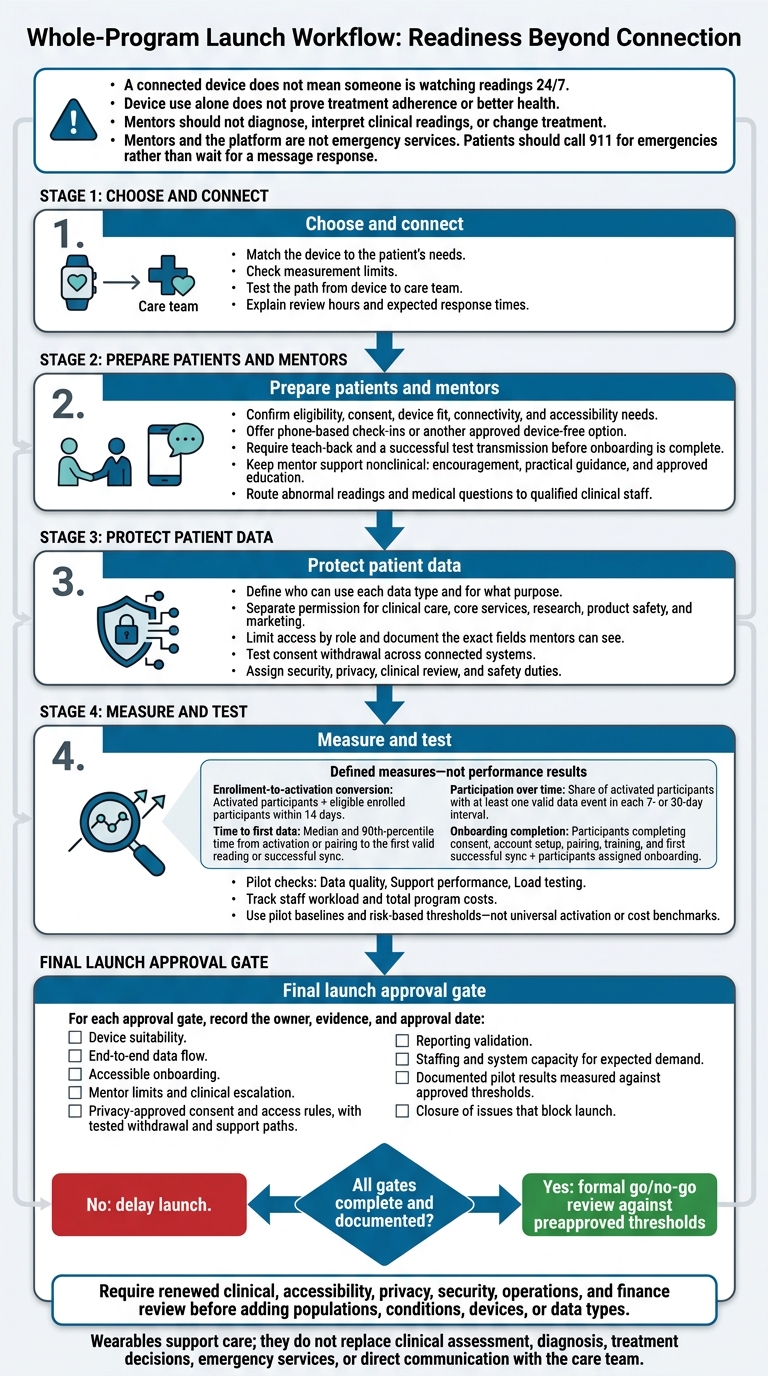
I start with the patient’s goal - not the wearable. Before enrollment, I check device fit, test data delivery, assign reviewers, and explain when patients can expect a response. A connected device does not mean someone is watching readings 24/7.
Here’s the plan I use:
- Choose and connect: Match the device to the patient’s needs, check measurement limits, and test the path from device to care team.
- Prepare patients and mentors: Confirm consent, use teach-back, and send a test reading. Keep mentor support nonclinical, with clear routes for medical questions. This approach aligns with proven mentorship impact on patient decisions and adherence.
- Protect patient data: Limit access, test consent withdrawal, and document security, privacy, and safety duties.
- Measure and test: Track activation within 14 days, participation over 7- or 30-day periods, staff workload, and total costs. Check pilot results before expanding.
My launch rule: <u>every approval gate needs an owner and documented sign-off.</u> Device use alone does not prove treatment adherence or better health. Wearables support care; they do not replace clinical review or emergency services.
Wearable Patient Engagement: Launch Readiness
Patient Onboarding, Mentorship, and Support
Explain Participation and Set Up Devices
Once you’ve selected devices and set alert rules, plan how patients will join and use the program.
Before enrollment, confirm eligibility and consent, the patient’s preferred communication channel, device fit, and accessibility needs. Check connectivity, access to charging, and authorized caregiver support. Offer phone-based check-ins or another approved device-free option. Explain the program’s purpose, what the device measures, how often it collects data, support hours, response times, how to leave, and any patient costs.
Onboarding isn’t complete until the patient finishes teach-back and sends a successful test transmission. Device delivery alone isn’t enough. Ask the patient or authorized caregiver to demonstrate charging, positioning, pairing, and checking synchronization. Give them plain-language troubleshooting and replacement instructions, along with a one-page support card listing contact numbers, service hours, expected response times, and after-hours directions. Use FDA-aligned usability testing with the intended patient population.
After setup, specify which wearable signals mentors may use and which must stay with the clinical team.
Use Approved Data for Mentor Outreach
For PatientPartner programs, wearable data can support real-time peer mentorship for patients considering or adopting a treatment, medication, or surgery. Before sharing participation indicators - such as missed transmissions or a patient’s request for contact - confirm connections and consent. Set role-limited mentor access, documentation requirements, and escalation duties.
Mentors may use approved data to support adherence, identify setup or cost barriers, share approved education, and route concerns to the right team. They should not diagnose, interpret clinical readings, or change treatment. Give them approved language and a clear destination for each handoff.
Route Patient Issues to the Right Team
Assign named owners and backup coverage before enrollment. The response targets below are program-design options, not fixed requirements. Check them against staffing and clinical risk. Mentors and the platform are not emergency services. Patients should call 911 for emergencies rather than wait for a message response.
| Issue | Responsible team and response expectation | Approved message | Required documentation | Escalation destination |
|---|---|---|---|---|
| Missing readings | Technical support; acknowledge within the published routine window | Ask the patient to check charging, fit, Bluetooth, permissions, and connectivity. | Missing period, checks completed, data receipt | Engagement team for participation barriers; clinical review when required by protocol |
| Pairing or app failure | Technical support; same-business-day response | Offer guided troubleshooting or a callback; avoid unsafe repeated steps. | Device model, app version, error, attempted fixes | Technical support coordinator for vendor, administrator, or replacement follow-up |
| Repeated abnormal readings | Clinical review; protocol-defined urgent interval | State that a qualified reviewer will assess the readings; do not interpret them. | Reading timestamps, reported symptoms, notification and handoff times | Treating or on-call clinician; safety team when required |
| Reported symptoms | Clinical review; immediate emergency escalation for urgent symptoms | Follow approved care-plan instructions; call 911 for an emergency. | Symptoms, onset, message given, disposition | Treating clinician or emergency services |
| Discomfort, fatigue, cost, or accessibility barrier | Engagement team; published routine window | Discuss approved accommodations, caregiver help, or device-free participation. | Barrier, patient preference, agreed action | Program manager; clinical review if the device is medically required |
Before launch, set consent, access, and audit rules for the onboarding and outreach workflows.
sbb-itb-8f61039
Remote Monitoring of Patients with a Wearable Device
Privacy, Security, and Regulatory Requirements
Once wearable data enters the platform, define who can use it, for what purpose, and under which rule.
Map each step in the data path: device, app, manufacturer, platform, mentor, sponsor, provider, vendor, and analytics tool. Record each party’s role, purpose, and access. Include subprocessors and analytics vendors.
HIPAA-compliant workflow tools protect data held by covered entities and business associates. Consumer app data may fall outside HIPAA unless one of those entities provides the app. Before making compliance claims, have counsel review HIPAA, the FTC Act, HBNR, state privacy and health data laws, sector-specific laws, and GDPR. The amended HBNR covers health apps and similar technologies.
Define Consent and Data-Use Limits
Before a patient connects a device, explain exactly which measurements you collect, how often, who receives them, and how long you keep them. Include risks, contact details, and patient choices.
Separate permission for clinical care, core services, research, product safety, and marketing. Accepting platform terms is not blanket permission. Document the exact fields mentors can see. Research requires a separate assessment of authorization, waiver, and institutional review requirements. Record the notice version, timestamp, purposes, data categories, recipients, and any permission changes.
Make withdrawal work across every connected system. Record when it takes effect, stop collection and sharing covered by the revoked permission, and block later ingestion unless the patient renews permission. Explain separately whether support outreach will continue.
Give patients controls to disconnect devices and request deletion where available. Identify any existing care, billing, safety, or study records that must remain. Explain why you must keep them and for how long.
Apply these access and purpose limits to storage, exports, and vendor tools - not just the platform interface.
Set Security Controls and Audit Records
Document risks, including lost devices, account takeover, outdated firmware, cloud misconfiguration, and excessive access. Set patching deadlines and assign authority to suspend unsafe integrations.
Review mobile SDKs and tracking tools. Disable advertising tools you don’t need, inspect outgoing data, and keep health information out of URLs and event names. Disclosures through tracking tools can trigger privacy obligations even when the core platform is secure.
| Governance area | Purpose | Implementation point | Owner | Audit evidence |
|---|---|---|---|---|
| Consent | Enforce permitted uses | Enrollment, settings, ingestion checks | Privacy lead | Notice versions, permission and withdrawal logs |
| Least-privilege access | Restrict data by task | Patient, mentor, clinical, sponsor, and admin roles | Platform owner | Access matrix, quarterly reviews |
| Encryption | Protect transfers and storage | Connections, APIs, databases, backups | Security engineering | Configuration and test records |
| Authentication | Prevent access without permission | Logins, device enrollment, revocation | Identity team | MFA settings, verified device associations, revocation logs |
| Retention and deletion | Limit storage to justified periods | Application, warehouse, backups | Records owner | Retention basis, deletion records |
| Incident response | Contain breaches and assess notification duties | Monitoring and response playbooks | Security and legal | Incident timeline, preserved evidence, exercises, required notices |
| Vendor management | Control downstream handling | Procurement and contracts | Vendor-risk lead | Assessments, subprocessor terms, BAAs where applicable |
| Audit logging | Trace access and transfers | Portals, APIs, export tools | Security operations | Tamper-resistant logs of users, timestamps, views, exports, and changes |
Security controls don’t replace clinical oversight. Keep technical access separate from responsibility for reviewing the data.
Assign Clinical Review and Safety Duties
Assign a regulatory owner to verify intended use, labeling, and applicable FDA clearance, authorization, approval, exemption, or premarket requirements. Commercial availability alone proves none of these.
Put qualified clinical personnel in charge of thresholds, coverage, backup review, and escalation. FDA guidance emphasizes managing cybersecurity throughout the medical-device life cycle and addressing post-market vulnerabilities in networked medical devices.
Name safety and quality owners for adverse-event and product-complaint reporting, with backup coverage after hours. Train mentors on approved scripts and separate routes for clinical issues, adverse events, and product complaints, including after-hours handling. Send potential safety reports to the sponsor’s pharmacovigilance or quality team within documented timelines, using only the minimum necessary facts.
Reporting and Enterprise Scale Planning
With data review rules in place, turn wearable data into role-specific reports, cost controls, and checks for expansion.
Tailor Reports to Each Audience
Use descriptive dashboards for reporting, operational alerts for platform issues, and clinical queues only for approved workflows. Build reports around patient mentorship workflows so mentors and care teams can act without reworking the data path.
| Audience | Metrics | Frequency and detail | Permitted actions |
|---|---|---|---|
| Patients | Pairing, last sync, wear-time or reading completion, missing-data notices, support status | On demand; simple daily or weekly summaries of the patient's own data | Reconnect a device, complete readings, request help, update communication preferences, or view consent settings |
| Mentors | Pairing status, syncing, participation trend, missing-data duration, support volume, outreach timing | Daily queue with patient-level detail limited to approved data | Send approved support messages, document outreach, provide setup guidance, and route issues |
| Program managers | Enrollment-to-activation conversion, time to first data, participation over time, onboarding completion, support volume, escalation resolution, uptime, and data-quality issues | Daily dashboard plus weekly and monthly trends; aggregate by site, cohort, device, or program | Adjust onboarding, staffing, device inventory, messaging rules, and service-level targets |
| Clinical teams | Validated readings, alert status, review timestamps, and escalation outcome | Exception-based queue with the minimum patient-level detail needed for qualified review | Review validated alerts, document clinical action, and follow approved escalation protocols |
| Compliance teams | Consent coverage, access history, export activity, policy exceptions, retention status, and audit records | Monthly or quarterly reports plus on-demand audit detail | Investigate access, approve or restrict data use, document findings, and manage retention or disclosure controls |
| Executives | Activation, sustained participation, patient experience, support and clinical workload, cost per activated participant, uptime, and program outcomes | Monthly or quarterly aggregate reporting with cohort and budget comparisons | Approve funding, expansion, vendor changes, and risk mitigation |
Allow filters for program, condition, cohort, device model, geography, enrollment date, and reporting period. Block filter combinations that could expose very small groups. Use scheduled reports for recurring operational reviews and controlled exports for approved business needs. Where patients could be reidentified, aggregate or suppress the data.
Use U.S. formatting: October 4, 2026, 2:00 PM ET, 12,450 participants, 3.5%, and $125,000.
These views should guide support, clinical review, compliance, and budgeting decisions without changing the alert rules.
Measure Engagement and Program Costs
Create a metric dictionary that defines each measure’s numerator, denominator, eligibility rules, source, owner, and measurement window.
- Enrollment-to-activation conversion: Activated participants ÷ eligible enrolled participants within 14 days.
- Time to first data: Median and 90th-percentile time from activation or pairing to the first valid reading or successful sync.
- Participation over time: Share of activated participants with at least one valid data event in each 7- or 30-day interval.
- Onboarding completion: Participants completing consent, account setup, pairing, training, and first successful sync ÷ participants assigned onboarding.
Apply device-specific rules to wear-time or reading completion. Separate missing-data rates into nonwear, device failure, connectivity failure, and ingestion failure. Track treatment-start support separately from adherence-related indicators, such as self-reported dose completion or refill activity.
Report patient confidence with the survey response rate. Show mentor workload alongside caseload, response time, escalations, and handling time. Device use does not prove treatment adherence or health gains.
Use a consistent index date and publish eligibility rules with the dashboard.
Index-date options include enrollment, activation, treatment start, or first data.
Segment results by device, age group, language, geography, access needs, or program cohort only when consent, law, and minimum-cell-size rules permit it. Check for missing-data bias: participants with poor connectivity, limited digital access, disability-related barriers, or lower engagement may be underrepresented. Report associations - not causal gains unless an appropriate evaluation supports them. Use these measures to assess readiness for expansion.
Build a total-cost model that combines one-time, recurring, variable, and exception costs. Include device purchases or leases, accessories, connectivity, software, integration, testing, vendor fees, onboarding, support, accessibility services, shipping, and replacements. Also track clinical review, safety monitoring, compliance, analytics, administration, downtime, remediation, and change management.
Report total program cost and cost per enrolled participant, activated participant, participant with 30 days of valid data, and resolved escalation. State whether those costs include internal labor, taxes, vendor minimums, and one-time implementation expenses.
Once reports and metrics are defined, verify that they work under peak load before expanding enrollment.
Test the Program Before Expanding
Pilot testing should confirm that reporting, support, and operations work at production volume. Use pilot baselines and risk-based thresholds rather than universal activation or cost benchmarks. Require a formal go/no-go review against preapproved thresholds - not enrollment totals alone. Focus on three checks:
- Data quality: Check completeness, units, duplicates, and reconciliation of delayed records after outages. Maintain a device and integration registry with model, firmware, API version, data types, units, calibration or validation status, and support dates.
- Support performance: Confirm that patients across supported languages and accessibility needs can complete onboarding, and that staff can resolve exceptions. Set targets for inventory, shipping, returns, and replacements. Plan coverage across U.S. time zones and daylight-saving changes.
- Load testing: Test ingestion, storage, messaging, dashboards, exports, and alert queues against expected peak demand. Use synthetic transactions and service metrics to check API availability, ingestion latency, duplicate and missing-data rates, queue depth, notification delivery, and how current dashboard data is. Verify tenant isolation, configurable program rules, and recovery after downtime.
Require renewed clinical, accessibility, privacy, security, operations, and finance review before adding populations, conditions, devices, or data types.
Conclusion: Check Launch Readiness
After checking data, workflows, privacy, and scale, use this final review to confirm that the program is ready to launch.
Connecting a device doesn’t make an engagement program ready to launch. Check that the device fits the patient’s needs, data reaches the right place in the platform, and setup is accessible. Document device limits, and explain that a missing reading may reflect a technical issue - not a clinical one.
Define mentor duties as encouragement, practical guidance, and approved nonclinical support. Send abnormal readings and medical questions to clinical staff, and clearly publish review hours.
For each approval gate, record the owner, evidence, and approval date:
- Device suitability.
- End-to-end data flow.
- Accessible onboarding.
- Mentor limits and clinical escalation.
- Privacy-approved consent and access rules, with tested withdrawal and support paths.
- Reporting validation.
- Staffing and system capacity for expected demand.
- Documented pilot results measured against approved thresholds.
- Closure of issues that block launch.
If any item is incomplete, delay launch.
Include this limit in patient materials and the platform’s mentorship guidance: Wearables support care; they do not replace clinical assessment, diagnosis, treatment decisions, emergency services, or direct communication with the care team.
FAQs
How do we choose between consumer and medical-grade wearables?
Choose based on how the data will be used. Prioritize medical-grade wearables for high-quality, condition-specific clinical monitoring and integration with clinical workflows. Consumer wearables can support broader engagement or lower-risk tracking, but their data may be self-reported, vary in quality, or be less suited to condition-specific metrics.
For either type, require HIPAA-grade privacy and security, clear explanations of what’s tracked, and smooth interoperability with EHRs and clinical systems - for example, through HL7 FHIR - so care teams can act on the data.
How can we prevent wearable alerts from overwhelming staff?
Send through only high-priority signals, using risk scores and early-warning thresholds to act on warning signs 7–14 days in advance - not every update. Give each role a dashboard that pairs historical data with real-time alerts for quick triage.
Set clear response protocols so alerts lead to defined actions, not more meetings. Limit patient-level detail by making de-identified or aggregated views the default, with role-based access and audit logs.
How can we measure mentorship’s impact beyond device use?
Measure mentorship by patient pathway outcomes, not just device engagement. Track time from referral to mentor match, completed mentor sessions, patient confidence before and after sessions, treatment starts, adherence, follow-up completion, and changes in adoption or drop-off.
Include patient-reported outcomes and experience measures, sentiment analysis, and mentor notes. Use real-time dashboards and alerts to assess whether mentorship improves outcomes when it matters most, such as when treatment begins or adherence slips.