


7 AI Workflows for Pharma Patient Support Teams

Key Takeaways
Author


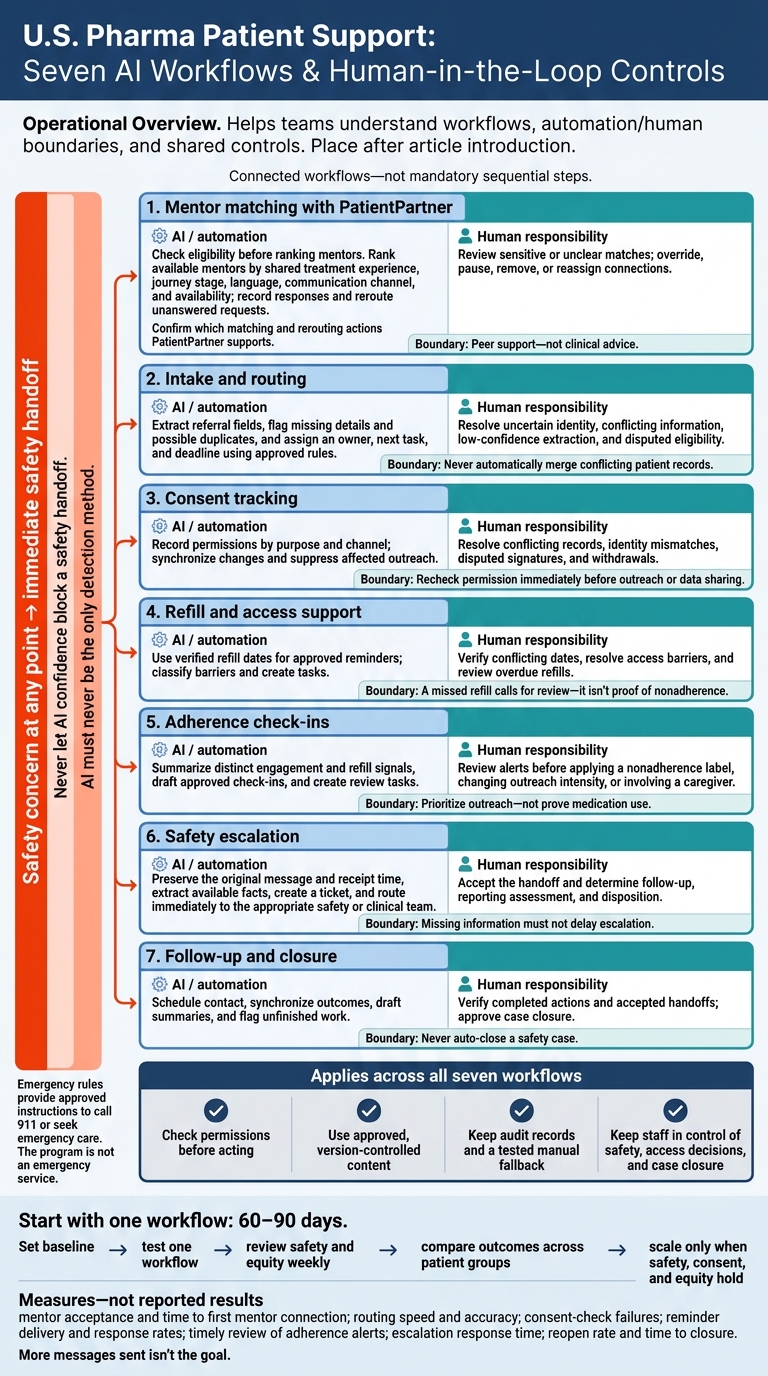
I’d start with one AI workflow - not all seven - and test it for 60–90 days. For U.S. pharma patient support teams, the goal is less admin work and fewer stalled cases, with staff in control of safety, access decisions, and case closure.
Here are the seven workflows I’d consider:
- Mentor matching with PatientPartner: Help connect patients with eligible peer mentors for personal support - not clinical advice.
- Intake and routing: Extract referral details and assign cases to the right team.
- Consent tracking: Record permissions, check them before outreach, and honor withdrawals.
- Refill and access support: Use verified refill dates for reminders and route barriers to staff.
- Adherence check-ins: Flag possible support needs without treating missed contact as proof of missed medication.
- Safety escalation: Route potential safety reports immediately, even when details are missing.
- Follow-up and closure: Schedule contact, track unfinished work, and require staff approval before closing cases.
My rule: <u>check permissions before acting, and never let AI delay a safety handoff.</u> I’d measure each pilot against the current process, review results across patient groups, and scale only when safety, consent, and patient outcomes support it. More messages sent isn’t the goal.
7 AI Workflows for Pharma Patient Support Teams
AI-Enabled Patient Support: Predicting Risk to Enable Earlier Intervention
sbb-itb-8f61039
Set Up Data Access, Consent, and Safety Rules
Before a workflow goes live, set clear rules for data access, consent, and safety. Build a one-page data map with legal, privacy, security, medical, pharmacovigilance, and operations teams. Document each workflow’s purpose, allowed fields, systems of record, integrations, and owner. Use a stable patient or case ID rather than matching names. Apply role-based access and HIPAA’s minimum necessary standard where applicable.
Classify each party as a covered entity, business associate, subcontractor, or out of scope. Execute a business associate agreement where required, and review state privacy laws, consumer health data laws, and communication requirements. Vendor contracts should address subprocessors, security, breach notice timing, model-training limits, and data return or deletion. Set retention periods for each record type, including consent evidence, safety reports, and AI logs.
Keep a version-controlled, medically reviewed content library for patient outreach. Include approval dates, review dates, version numbers, and blocked outputs. Document approved rules that block diagnosis, treatment advice, and coverage guarantees.
Store consent in structured records by purpose and channel, including timestamps, notice versions, and withdrawal status. Recheck permission immediately before outreach or data sharing. Enrollment consent does not automatically permit mentor contact, marketing, or research.
Require human review when identity is uncertain, consent records conflict, clinical questions arise, or a message may contain a safety report. Give each fallback queue an owner, backup, response target, and escalation path. For potential adverse events, preserve the patient’s original wording and receipt time, then route the report promptly under approved pharmacovigilance procedures. Never let AI confidence block a safety handoff.
Before launch, test outreach, routing, and escalation against withdrawn consent, duplicate records, integration outages, after-hours messages, and requests to speak with a person. Confirm that receiving staff get the correct case, urgency, consent status, and next action.
Check notices, accessibility and interpreter needs, preferred channels, contact hours, and appointment time zones - including daylight saving time changes. Log automated actions, content versions, human edits, and outcomes. Require sign-off and a tested manual fallback.
1. AI-Assisted Mentor Matching With PatientPartner
PatientPartner is a B2B enterprise SaaS platform for real-time patient mentorship that supports treatment starts, adoption, and longer-term adherence. Use AI to speed matching - not to provide clinical guidance. Confirm which ranking, eligibility, request, and rerouting actions PatientPartner supports. Start with matching, where AI can shorten wait times while keeping staff judgment in place.
Workflow Triggers and Required Data
Begin matching when an eligible patient requests peer support, completes support program enrollment, starts a new prescription, misses an expected onboarding step, or shares doubts about treatment.
Collect only what the program needs: therapy journey stage, treatment experience, language, preferred communication channel, availability, time zone, and the support the patient wants. Require verified mentor profiles that document identity, relevant treatment experience, training, and current eligibility.
Automation Actions and Integrations
Check eligibility before ranking mentors. Then rank available mentors by shared treatment experience, journey stage, language, communication channel, and availability.
The workflow can send a request, notify the mentor, record whether they accept or decline, and reroute the request if no one responds within the response window. If no suitable mentor is available, send the case to a staffed queue.
Map matching events into the CRM or case system. After a match, intake routing can send the case to the right team.
Human Review and Escalation
Require staff review for sensitive or unclear matches involving minors, pregnancy-related concerns, language or accessibility gaps, conflicts of interest, serious mental-health signals, urgent treatment issues, or safety disclosures.
Staff must be able to override a match, pause a mentor, remove a connection, or reassign the case. Mentors share personal experience and practical support. They do not diagnose, recommend treatment changes, or replace clinicians. Send clinical questions and safety disclosures to clinical staff immediately.
Consent Controls and Audit Records
Get explicit consent for profile sharing, communication channels, and conversation recording or retention. Include sponsor access in that consent when it affects who can see profiles or conversations.
Keep records of the match rationale, rules version, response status, staff overrides, and reroute reasons. Track time to match, patient-rated relevance, treatment starts, and adherence as separate measures.
2. Patient Intake and Routing
Workflow Triggers and Required Data
After a referral or match, intake turns the request into a routed case. Start intake from web forms, phone calls, email, patient portals, and provider or pharmacy referrals.
Create one case record for each submission. Include the patient’s name, date of birth, preferred contact information, ZIP code, therapy or product, prescribing provider, referral source, urgency indicators, and preferred channel. Add coverage status when needed for access support. These details determine who owns the case, how urgent it is, and what happens next.
Automation Actions and Integrations
Use AI to extract fields from documents, messages, and call transcripts. Check required fields and formats, retain each field’s source and confidence score, and flag possible duplicates before creating records.
Apply approved, version-controlled eligibility and routing rules based on therapy, geography, urgency, or case type. Write the assigned owner, source documents, next task, and deadline to the CRM. This reduces re-entry and helps teams coordinate therapy-start support. Send integration failures to a monitored exception queue.
Human Review and Escalation
Staff must resolve missing or conflicting details, low-confidence extractions, possible duplicates, unclear therapy identification, and disputed eligibility. Never automatically merge conflicting patient records. Trained staff must make final patient-facing decisions.
Require immediate human review for safety concerns and same-business-day handling for documented barriers to starting therapy. Assign a backup owner to each queue.
Consent Controls and Audit Records
Recheck channel-specific consent before outreach. Record the consent language, timestamp, source, and withdrawal status.
3. Consent Collection and Tracking
Once intake assigns a case, consent determines what the team can share, automate, or suppress.
Workflow Triggers and Required Data
Start this workflow at enrollment, mentor-contact requests, new services, channel changes, record imports, expirations, and withdrawals. Record the patient ID, purpose, permitted data, recipients, channels, effective dates, status, source, and recorder.
Keep program consent, HIPAA authorization, privacy notice, and channel preferences in separate, versioned records.
Automation Actions and Integrations
Use automation to show the approved form, collect an electronic signature or other authorized acknowledgment, check required fields, and save the result to the system of record. Sync permission changes across the CRM, patient-support hub, and outreach tools.
Base renewal alerts on the authorization’s actual expiration terms, with configurable reminders at 90, 30, and 7 days. Pause outreach and assign a task to authorized staff if the authorization expires, a signature is missing, statuses conflict, or synchronization fails.
Human Review and Escalation
Send disputed signatures, identity mismatches, unclear or translated language, representative requests, coercion concerns, privacy-access or deletion requests, and outage-affected records to privacy, compliance, or patient-support staff. Review high-risk cases the same day and routine corrections within one business day.
Handle withdrawals received by phone, portal, email, text, or staff entry through a standard case process: verify identity, update the ledger, and suppress affected outreach immediately after validation. A written HIPAA authorization revocation generally takes effect when the covered entity receives it.
Consent Controls and Audit Records
Use approved templates for enrollment, data sharing, mentor contact, SMS or email communications, renewal, and withdrawal. Track each template’s owner, approval date, effective date, jurisdiction, language, accessibility review, and version number.
Store the exact language shown to the patient, not just the current template. Prevent staff from editing regulated language during live enrollment. Forms should use plain language, clear affirmative choices, accessible design, appropriate translations, and separate opt-ins for different purposes. HIPAA authorizations must identify the information, parties involved, purpose, expiration, and revocation rights.
Retain signed artifacts, signer identity and authority, authorization scope, template versions, timestamps, status and preference changes, renewal history, verification records, and synchronization and suppression logs.
4. Refill Reminders and Access Support
Workflow Triggers and Required Data
Use verified refill dates, not AI estimates. AI can flag when support is due; staff handle access barriers and exceptions. Collect the prescription ID, last-fill date, days’ supply, expected refill date, pharmacy, and active prescription status.
Check refill timing against dispensing records, claims, or confirmed patient updates. Recalculate after partial fills or prescription changes. Flag conflicting dates for review and honor care-team holds. Use these dates to guide reminders, access triage, and refill follow-up.
Automation Actions and Integrations
After timing is verified, automation can send reminders, route barriers, and log outcomes. Connect pharmacy data with the CRM, messaging, and scheduling tools. Set a rule-based window, such as 7 to 14 days before the expected refill date, and send an approved reminder through the permitted channel.
Keep personalization within approved fields, language, and contact times. Log delivery and replies, schedule limited follow-ups, and route failed messages for contact updates.
| Trigger | Automated action | Human review | Owner |
|---|---|---|---|
| Refill window opens | Send approved reminder | Resolve refill-help requests; arrange follow-up | Patient services |
| Access barrier reported | Classify barrier; open task | Screen for approved assistance options | Benefits/access specialist |
| Refill overdue | Flag case for review | Verify fill status; arrange follow-up | Patient-support case manager |
| Refill confirmed | Record event; suppress current-cycle reminders | Reconcile dispensing data; verify next window | Patient-support operations |
| Opt-out received | Suppress channel; sync across systems | Resolve suppression exceptions | Privacy/compliance, if needed |
Route urgent non-refill issues to the designated safety or clinical owner using approved escalation procedures.
Human Review and Escalation
A missed refill calls for review - it isn't proof of nonadherence. Before following up, check for alternate pharmacy use, coverage changes, partial fills, hospitalization, or planned discontinuation.
AI can classify replies and create tasks. It must not recommend dose changes, interpret symptoms, or close safety cases on its own. Route unresolved refill gaps into adherence check-ins and drop-off alerts.
Consent Controls and Audit Records
Before each reminder, verify that the channel is still active. HHS generally permits refill reminders for a currently prescribed drug without separate marketing authorization. Channel rules, privacy safeguards, and patient preferences still apply. Keep medication details out of shared-device previews and voicemail.
Record the refill source, rule, template version, delivery result, response, owner, follow-up date, and closure reason. Feed refill events, opt-outs, and failed messages into case follow-up. Log when suppression reaches each connected system so another campaign cannot restart stopped outreach.
5. Adherence Check-Ins and Drop-Off Alerts
After refill support, unresolved engagement signals move here for structured follow-up.
Workflow Triggers and Required Data
Use unresolved check-in, refill, and engagement signals to prioritize outreach - not to prove medication use. Flag missed check-ins, unresolved refill gaps, repeated failed contact attempts, incomplete support interactions, and patient-reported barriers.
Label each signal separately. Include source dates, missing fields, and confidence limits. Pause or lower its priority when conflicting refill dates, prescription changes, discontinuation, or other records make the signal unreliable.
Then route the flagged case to the right queue.
Automation Actions and Integrations
Connect pharmacy or claims feeds with the CRM, messaging, scheduling, and case management systems. AI can then summarize signals, create review tasks, and draft plain-language check-ins.
Use three labels: routine follow-up, check-in recommended, and staff review. Each loss-to-follow-up alert should show the signals behind it. Let patients select cost, transportation, pharmacy coordination, side effects, forgetfulness, uncertainty, or no help needed as their response, with space to write more.
Human Review and Escalation
Use alerts to route support, not to infer nonadherence from a single signal. Require staff review before assigning a nonadherence label, sending repeated or sensitive messages, changing outreach intensity, or involving a caregiver.
Route access barriers to benefits, pharmacy, financial-assistance, or scheduling teams. Send clinical and safety concerns through approved escalation and reporting procedures. Don’t delay those handoffs for routine review.
When authorized and wanted, offer PatientPartner peer mentorship for practical support only - not clinical advice or medication-use verification. Make opting out simple.
Before launch and during monitoring, compare false-positive rates, false-negative rates, and positive predictive value across relevant groups. Check for channel disadvantages tied to limited broadband, smartphone access, English proficiency, or stable contact information.
Measure more than engagement. Track time to human review, successful contact rate, resolved access barriers, opt-outs, complaint rate, and clinically appropriate escalations.
Consent Controls and Audit Records
Before outreach, confirm permission for the purpose, channel, and recipient. Check preferred language, contact times, caregiver permissions, and disclosure limits. Apply role-based access, minimum-necessary use, secure messaging, and audit logs.
Keep a record of the timestamp, source data, alert reason, rule or model version, reviewer, decision, message content, delivery status, patient response, and outcome. Recheck consent whenever the purpose, channel, or recipient changes. Records involving substance-use-disorder information may have additional requirements under 42 CFR Part 2.
6. Safety and Complex-Case Escalation
Any workflow - from mentor chats to refill follow-up and adherence alerts - can bring a safety issue to light. This section defines the handoff: route any safety issue found during a check-in to the safety queue immediately.
Workflow Triggers and Required Data
Monitor patient messages, mentor interactions, and staff notes across patient support channels. Classify each case as a safety event, urgent symptoms, medication question, access barrier, complaint, or technical issue.
Collect patient and reporter contact details, product name and strength, event description, onset date and time, seriousness indicators, relevant history, concomitant medicines, outcome, and permission to follow up. Missing information must not delay escalation. AI can extract facts and flag risk, but it must not diagnose or determine causality.
Automation Actions and Integrations
Connect the CRM, case-management, and pharmacovigilance systems. Set rules to create tickets, attach the source message and relevant history, timestamp receipt, and require acceptance by the receiving team. If no queue is available or no one accepts the case, send it to a supervisor or on-call backup.
Emergency rules must override routine automation and provide approved instructions to call 911 or seek emergency care. State clearly that the program is not an emergency service. Never wait for an AI confidence score.
Human Review and Escalation
Use the decision table below to set internal service targets, subject to product-specific procedures. Emergency instructions must never wait for human approval.
| Case type | AI action | Responsible team | Internal response target | Human approval |
|---|---|---|---|---|
| Potential adverse event | Extract facts, flag seriousness, and create a safety ticket | Pharmacovigilance | Immediate queueing | Authorized safety reviewer confirms case handling and reporting assessment |
| Urgent or potentially life-threatening symptoms | Trigger approved emergency instructions and an alert | Emergency services first; support supervisor or clinical team for follow-up | Immediate | Trained human confirms outreach and documentation |
| Medication question | Classify the topic and retrieve approved content | Pharmacist or authorized clinical support | Same business day or product-specific target | Qualified reviewer approves the response |
| Incomplete or ambiguous report | Identify missing fields and request follow-up | Assigned support or safety team | Prompt review | Human determines next follow-up |
| Access issue discovered during a safety contact | Identify the barrier and open a service ticket | Benefits, reimbursement, or patient-services team | Within one business day | Agent confirms available options |
| Complaint or quality concern | Capture complaint details and route to the quality team | Quality, complaints, or regulatory team | Per complaint procedure | Authorized quality reviewer determines next steps |
| Technical issue | Identify error details and open an IT ticket | Technical support | Per IT service target | Support agent confirms resolution |
These targets are internal service commitments, not reporting deadlines.
For example, FDA materials describe a 15-calendar-day reporting timeframe for qualifying serious, unexpected postmarketing adverse experiences, while certain unexpected fatal or life-threatening IND suspected adverse reactions have a 7-calendar-day timeframe.
Authorized safety staff must confirm the applicable clock and reporting pathway. Limit responses to version-controlled prescribing information, medication guides, approved FAQs, and emergency scripts. If there’s no approved answer, create a human-review task instead of generating advice.
Consent Controls and Audit Records
Keep support permissions separate from safety-processing obligations. Maintain separate consent records for support outreach and safety follow-up. Where applicable, record permissions for mentor contact and information sharing with vendors or healthcare professionals. Store consent status, timestamp, collection channel, policy version, scope, and withdrawal history.
Preserve the source report, triggered rules, content version, reviewer decisions, handoff acceptance, and follow-up history. Never auto-close a safety case. An authorized reviewer must confirm required follow-up, safety-system transfer, and reporting disposition.
Keep trained staff, rule checks, backup channels, and safety-team sampling in place. AI must never be the only detection method.
Once the case is stable, move it into follow-up scheduling and closure.
7. Follow-Up Scheduling and Case Closure
After intake, refill support, or escalation, this workflow moves open work into scheduled follow-up and closes cases only after required checks.
Workflow Triggers and Required Data
Start follow-up after intake, refill support, mentor contact, or escalation. Triggers include missed appointments, unresolved access issues, and staff-defined follow-up dates.
Record the case ID, follow-up reason, urgency, assigned specialist or mentor, preferred contact method, contact details, preferred language, availability, time zone, consent status, and communication restrictions. Route time-sensitive or safety-related cases to the appropriate human queue immediately.
Automation Actions and Integrations
Connect the organization’s approved calendar, messaging, phone/video tools, and case-management system. Offer a few available slots in the patient’s local time zone. Store that time zone with the appointment, account for daylight saving time, and prevent double-booking.
Confirm the date, time, time zone, participant, channel, duration, and rescheduling instructions. Keep unnecessary health details out of calendar titles. Where permitted, send reminders 24–48 hours before the session.
Sync confirmed, canceled, no-show, completed, and unable-to-reach outcomes back to the case. For routine missed contacts, a program-approved rule may allow two attempts through the preferred channel, at least one business day apart. After those attempts, create a staff task rather than closing the case automatically.
Human Review and Escalation
AI can draft the interaction summary and flag unanswered questions, incomplete referrals, missed mentor handoffs, or requested callbacks. Before closure, give every pending action an owner and due date, and escalate overdue work.
Staff must compare the draft with the source interaction. They must verify completed actions, accepted handoffs, and required feedback before approving closure. A completed appointment alone is not enough.
Use standard dispositions: resolved, declined more help, transferred, unable to reach after approved outreach attempts, or administrative closure. Require a reason code and, where applicable, a receiving owner. Do not mark unreachable patients as resolved, and keep unresolved needs open for review.
Reopen cases when patients reply, request another session, report a new barrier, or share information that changes the closure decision. Preserve the case history and assign a new owner, priority, and deadline.
Consent Controls and Audit Records
Before each reminder or mentor booking, check current appointment preferences, contact restrictions, and permission for that booking or reminder. Sync preference changes across connected systems.
Log appointment changes, delivery results, AI drafts, staff corrections, task completion, closure approval, and reopening events.
Set a monthly quality-review policy that covers a sample of routine closures and all escalated cases. Check summary accuracy, permissions, completed actions, and accepted handoffs. Track closure errors and reopening rates, then use the findings to revise callback rules and staff training.
Conclusion: Pilot and Measure the Workflows
Before scaling, test one workflow in one program. Start with a 60- to 90-day pilot for a defined patient population, with success criteria specific to that workflow. If mentorship is the priority, evaluate PatientPartner on voluntary participation, mentor acceptance, and time to first mentor connection. Review safety and equity every week throughout the pilot.
Before launch, confirm that content is approved, integrations are validated, and controls are tested. Those controls should cover consent, access, human review, and escalation.
Measure the pilot against today’s process. Set baselines before activation and use a control group when feasible. Track the outcomes that match your workflow:
- Mentor acceptance and time to first mentor connection
- Routing speed and accuracy
- Consent-check failures
- Reminder delivery and response rates
- Timely review of adherence alerts
- Escalation response time
- Reopen rate and time to closure
Compare results across relevant patient groups and record sample sizes. Focus on outcomes, not message volume.
Stop the pilot for serious missed safety signals, disclosures without permission, repeated inappropriate outreach, unresolved consent errors, or a disparity that hasn’t been addressed. Scale only when safety, consent, and equity hold at pilot scale.
FAQs
Which workflow should our team pilot first?
Start with appointment reminders and refill-related support. These frequent, repetitive tasks don’t require clinical judgment. You can automate them with clear limits and a direct route to human support when safety concerns or exceptions come up.
How can we measure AI’s impact on staff workload?
Compare performance metrics before and after adding AI tools. Track the average time it takes to connect with a mentor or staff member, the number of routine queries resolved without human help, and total staff hours saved. Account for time spent on corrections and escalations when calculating those savings.
Review these metrics alongside human-intervention rates to see how workloads have changed and where processes need adjustment.
How should we validate AI safety alerts?
Before launch, set clear escalation rules and human handoffs. Send adverse events, product complaints, and clinical exceptions straight to trained staff - don’t wait for the AI to finish. Keep immutable audit trails and transcripts to verify communications and safety triggers.
Review resolved requests and human intervention rates, putting reliability ahead of volume. Assess risks so urgent needs bypass automation. Review the rules quarterly to check for drift and compliance gaps.