


10 Digital Consent Tools in Healthcare

Key Takeaways
Author


I’d choose digital consent tools by workflow - not by signature features alone. Start with the consent type, who can sign, and where the record must go. A signed form does not replace clear information, questions, and patient choice.
This guide covers 10 tool categories, not vendor rankings:
- Program enrollment: Separate mentorship and support permissions from treatment consent.
- Electronic signatures: Link each signature to the exact form signed.
- Video and interactive education: Explain choices and flag questions for staff.
- Audit trails: Track actions, changes, and withdrawals.
- Multilingual, accessible, and mobile forms: Support language needs and different ways to complete consent.
- Identity and representative checks: Confirm who is signing and their legal authority.
- Form builders and version control: Keep approved forms current without changing past records.
- Portal, SMS, email, and kiosk delivery: Send forms securely and track progress.
- Analytics and status reports: Find completion barriers and outdated permissions.
- EHR, CRM, and document integrations: Keep signed records and permission updates aligned.
My starting rule: <u>test the whole process before buying</u> - from patient access and signing to copy delivery and withdrawal. Check the U.S. rules that apply to each workflow, including HIPAA, research requirements, and 21 CFR Part 11 where applicable.
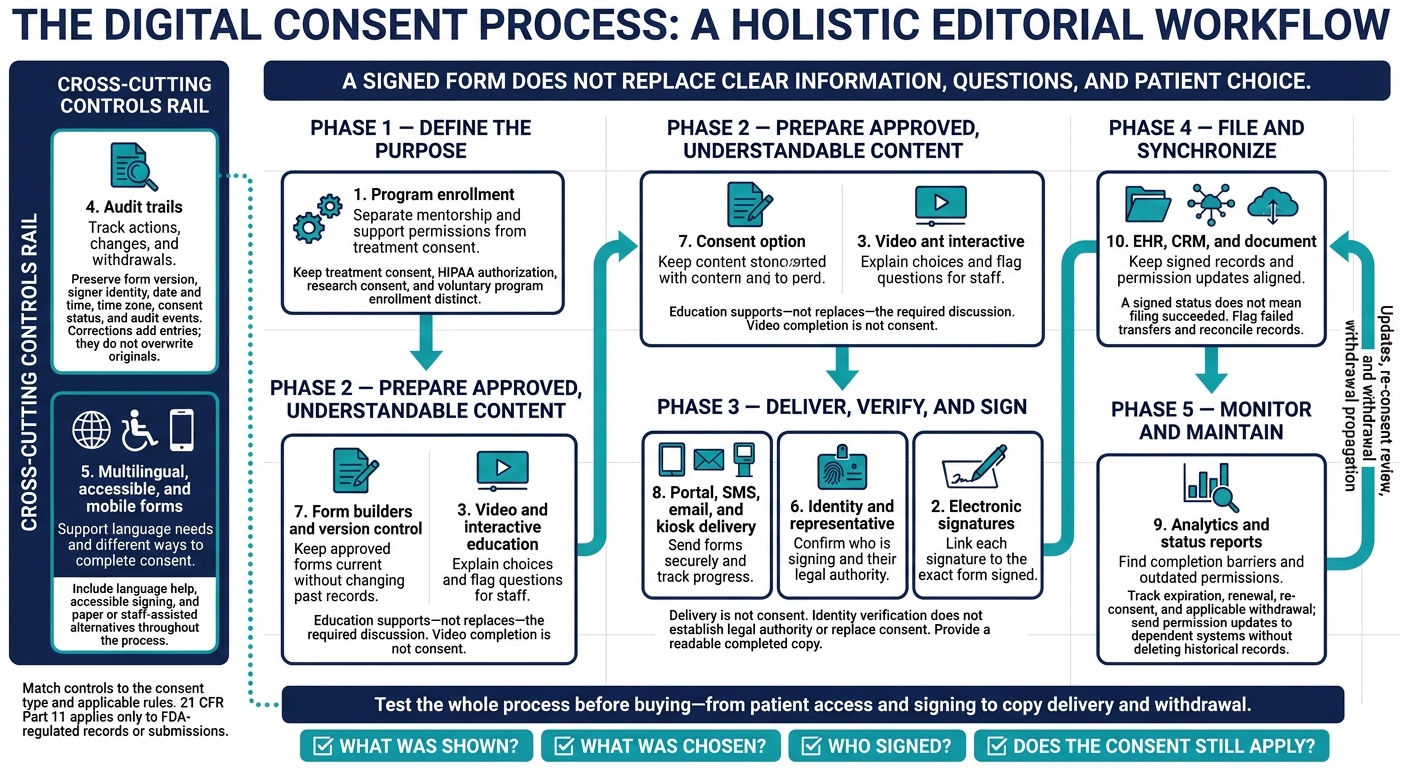
10 Digital Consent Tools Across the Healthcare Workflow
Interlace Health Digital Consent Form and Signature Demo at HIMSS 2024
sbb-itb-8f61039
U.S. Healthcare Consent Requirements
Each consent workflow has its own legal and technical requirements.
Treatment consent records a patient’s agreement to an examination, procedure, medication, or other clinical intervention. Requirements depend on state law, professional standards, and facility policy. HIPAA authorization permits specified uses or disclosures of PHI outside treatment, payment, or operations. It must identify the information, recipients, purpose, expiration, signature, and revocation notice.
Research eConsent must meet informed-consent and Institutional Review Board requirements under 45 CFR Part 46 and, when applicable, FDA regulations. Check the approved form version, required disclosures, opportunity for questions, and delivery of a copy to the participant. Voluntary program enrollment, such as mentorship or adherence support, needs separate participation terms, communication details, data-sharing terms, and withdrawal instructions. Optional enrollment must not be a condition of unrelated care.
Assess electronic-signature validity separately from informed-consent content. 21 CFR Part 11 applies only to FDA-regulated records or submissions. Determine whether it applies before choosing identity checks, audit trails, and controls that link signatures to records.
For HIPAA-covered workflows, review access controls, encryption, authentication, audit trails, and retention settings. A vendor handling PHI for a covered entity needs a written BAA that addresses permitted uses, safeguards, breach reporting, and subcontractor obligations. A patient’s HIPAA authorization cannot replace a required BAA. These requirements guide identity checks, audit logs, and record retention.
Document reviews by clinical, privacy, legal, security, and compliance teams, along with research oversight when applicable. Check state rules for minors, representatives, telehealth, and sensitive information.
Require the platform to record and preserve the form version, signer identity, date and time, time zone, consent status, and audit events. Use U.S. date format and include a time zone or UTC offset with each recorded time. Set retention and review schedules before deployment.
1. Patient Mentorship and Program Enrollment Consent
PatientPartner is a B2B patient mentorship platform for pharmaceutical and med-tech organizations. Use it only if its consent controls fit your enrollment workflow. For mentorship programs, keep enrollment terms separate from treatment consent.
Consent Purpose and Process
Program enrollment is not treatment consent. Joining a patient mentorship or support program is a separate decision from agreeing to diagnosis, treatment, surgery, or medication use.
Give patients separate choices for participation, mentor contact, communication channels, sponsor data sharing, and follow-up. State who sponsors the program, how long it lasts, any costs or incentives, and what mentors can and cannot do. Route PHI outside treatment, payment, or operations through HIPAA authorization.
Use separate checkboxes for participation, contact preferences, data sharing, research, and marketing. Once enrollment terms are clear, establish who can sign and what information they can access.
Patient Access and Identity Checks
Match the patient’s name, date of birth, phone number, and address. Then apply risk-based identity verification before showing enrollment or health information.
Use one-time codes for low-risk access. For high-risk actions, require multifactor authentication, ID review, or staff approval. Give mentors access only to information needed for support, and document each representative’s authority and scope. Add every verification step to the consent record.
Record History and Retention
Track each permission - not just enrollment status. Store the signed form, form version, timestamp, identity check result, selected permissions, and withdrawal status.
Withdrawal should stop future optional outreach and new data sharing, notify connected systems, and stay in the record. Explain that information already used or disclosed before revocation may not always be retractable.
Data Security and System Connections
During procurement, check security controls, contractual safeguards, and available connections to messaging, CRM, EHR, and document systems.
Synchronize only the minimum necessary fields: enrollment status, consent version, approved channels, expiration, withdrawal status, and a reference to the stored document. Before enrollment opens, test whether withdrawal reaches every connected system and confirm that failed updates trigger alerts.
2. Electronic Signature Tools
Once the consent content is approved, the next step is to collect a legally valid signature.
Consent Purpose and Process
Support typed names, click-to-sign, drawn marks, and biometric methods where permitted. Choose the method based on the workflow’s risk, state law, and applicable rules - not how the signature looks. A drawn mark alone is not a Part 11 electronic signature.
Show the approved consent language and required disclosures before signing. Use sequential signing when the patient must approve before the clinician. Use parallel signing when authorized parties can sign independently. The tool must preserve who signed, what they signed, and when.
Patient Access and Identity Checks
Offer remote signing through authenticated portals or secure links. Match identity checks to risk. Biometric verification may help establish who signed, but it also adds privacy and accessibility concerns. When a representative signs, record their role, relationship to the patient, and legal authority.
| Area | Advantage | Limitation or requirement |
|---|---|---|
| Convenience | Remote signing reduces paper handling | Keep a paper or staff-assisted fallback |
| Completion speed | Parallel signing reduces waiting between signers | Faster signing does not establish informed consent |
| Accessibility | Typed signatures avoid drawing barriers | Test keyboard navigation and screen readers |
| Evidence | Linked records help show what was signed | Preserve accurate, tamper-evident evidence |
Record History and Retention
Keep the signature bound to the exact consent version. For Part 11 records, preserve the signer’s printed name, execution date and time, and signature meaning, such as approval or verification. Store authentication evidence with the signed record. Never silently replace signed language with an updated template, and provide a readable completed copy.
Data Security and System Connections
Require encryption, role-based access, session timeouts, and tamper-evident audit logs. Test that completed documents and signature evidence arrive together in the correct EHR record. Set alerts for failed transfers. For FDA-regulated records, confirm Part 11 controls and documented validation.
3. Video and Interactive Consent Education
Consent Purpose and Process
Before a patient signs, use education tools to explain consent and improve patient decision making using plain language. Short videos, audio, diagrams, animation, and expandable text can cover procedures, risks, benefits, alternatives, privacy, and withdrawal rights.
Multimedia supports - not replaces - the required discussion with a clinician, investigator, or trained research staff. Use knowledge checks and teach-back prompts to spot misunderstandings. A correct answer alone does not prove capacity or understanding. For research, submit all media to the IRB and obtain approval for later changes.
Patient Access and Identity Checks
Link each session to the patient record used for consent, and verify identity before showing sensitive information. Offer a non-digital or staff-assisted option for anyone who cannot complete the process independently.
Include captions, a transcript, audio narration, pause and rewind controls, playback-speed options, and keyboard navigation. Provide translated versions and equivalent access. Before launch, test the experience on mobile devices, low-bandwidth connections, and screen readers.
Record History and Retention
Record the media version, approval date, language, transcript, completed sections, knowledge-check responses, and unresolved questions. Track staff follow-up separately from completion status.
Data Security and System Connections
Once education is complete, the system should route follow-up tasks - not finalize consent. Limit viewing analytics to completion tracking, and exclude advertising or unrelated tracking.
Education status and analytics are not final consent. They do not replace the required discussion, authorization, or signed consent. Completing a video must not automatically advance enrollment or consent.
4. Audit Trails and Document History
Consent Purpose and Process
When a patient views, signs, or withdraws consent, the system must preserve a complete audit trail. Keep delivery, views, disclosures, signatures, edits, cancellations, and withdrawals in one chronological log. Each entry should show what happened, when, to which version, and by whom, along with the result. Preserve the signed version, and record who made each change, when, and why. Publishing a revision must not overwrite earlier consent records.
Patient Access and Identity Checks
Record what the signature means. If a representative signs, include their relationship, legal authority, and scope of permission in the same audit record - not a separate note. Limit access by role, and log staff searches, downloads, and administrative actions.
Record History and Retention
Use a tamper-evident log. Add corrections as new entries rather than changing the originals. For withdrawals, record the effective date, scope, and downstream updates without deleting prior consent. Apply legal holds and approved destruction schedules by consent type. Where Part 11 applies, keep audit trails at least as long as the records they support.
Data Security and System Connections
The controls protecting a record also protect its audit history. For FDA-regulated records, support secure, computer-generated, time-stamped audit trails, validation, and signature-to-record linkage. Not every healthcare consent falls under 21 CFR Part 11. Document whether it applies based on the underlying FDA recordkeeping requirement.
Once the history is preserved, package it for export and downstream sync. Require an exportable packet containing the signed document, disclosures, signature details, version metadata, and audit log. Test that exports remain readable outside the app and match the information in the EHR, CRM, and document repository. Reconcile failed updates so a withdrawal doesn't leave an outdated active status in downstream systems.
5. Multilingual, Accessible, and Mobile Forms
Consent Purpose and Process
Once the form is traceable, language access helps patients understand what they’re agreeing to. Show language selection before the consent form and offer free language help. Use qualified translators, independent review, and a shared glossary to keep risks, benefits, alternatives, privacy disclosures, instructions, and withdrawal rights accurate.
Patient Access and Identity Checks
Match identity checks to the form’s risk level, and keep them separate from language choice. Forms must reflow on phones and support large text, screen readers, keyboard navigation, and visible focus states so patients can complete consent without accessibility barriers.
Label every field and explain how to correct errors. Offer an accessible signing option, such as a typed signature, instead of requiring patients to draw one. Provide an assisted route for patients without digital access.
Record History and Retention
Keep translation metadata with the signed consent record: the selected language, translation ID, source version, reviewer approval date, and interpreter assistance. The patient’s copy should include the translated disclosures they actually reviewed - not a newer translation.
Data Security and System Connections
Keep translation data intact as forms move between systems. Pass language and translation-version data through portal, EHR, and document-system links without overwriting the signed form.
After every material content or system change, test language switching, save-and-return, accessible signing, and copy delivery on common phones and assistive tools. Check that every system preserves the correct translation version to prevent version drift.
6. Identity Checks and Representative Permissions
Consent Purpose and Process
After language access, the next step is confirming who signed and whether they had authority to do so. Identity verification does not establish legal authority or replace consent. Explain why verification is needed, what is being signed, who is collecting it, whether participation is voluntary, and what happens if verification fails. For remote signing, present the required consent details before verification and signature. FDA guidance permits several verification methods; it does not require one technology.
Patient Access and Identity Checks
Match identity checks to risk. Use low-friction checks for low-risk enrollment and stronger verification for higher-risk actions. Use biometric checks only when legally and ethically appropriate. After a limited number of failed attempts, pause the process and offer review by trained staff - not unlimited retries. The check must also confirm legal authority, not just identity.
For minors, guardians, and legally authorized representatives, verify both the signer’s identity and their authority. Record the legal basis, scope, and expiration of that authority. A family tie alone does not confer authority. Follow state law, institutional policy, and research requirements for parental permission and the minor’s assent.
Record History and Retention
Record the verification method, result, signer role, authority basis, reviewer, and status changes alongside the consent version. Link the signed consent artifact to the exact version presented - not just the current form.
Store only the minimum identity data required. Set separate retention and deletion periods for signed consent, authority documents, failed-check logs, temporary ID images, and biometric data. Do not default to keeping these records indefinitely.
Data Security and System Connections
Send only verified identifiers, scope of authority, and consent status to connected systems. Limit representatives’ access to their verified authority. Expired or withdrawn permissions must no longer authorize future access or activity. Pass only verified signer data forward so version control can lock the approved record.
7. Consent Form Builders and Version Control
Consent Purpose and Process
Once signing and access controls are in place, keep form versions under tight control so patients don’t sign outdated forms.
Use approved templates for each consent purpose, with branching, required fields, and input validation. Ask only for necessary responses, and offer “not applicable” where appropriate. Before publishing, record approvals for clinical content, legal requirements, privacy, accessibility, and translation. Research forms also need institutional and regulatory review.
| Form type | Best use | Key control |
|---|---|---|
| Fixed | Standard acknowledgments | Check required fields and disclosures |
| Conditional | Treatment- or response-specific consent | Test every branch for required content |
| Guided workflow | Complex consent processes | Verify education, review, and signature steps together |
Patient Access and Identity Checks
Use verified identity data to load the correct approved form version. Before release, test language changes, proxy signing, interrupted sessions, and changed answers. When a response changes, dependent questions should update without leaving conflicting answers in the completed record.
Record History and Retention
Version control protects approved language from being overwritten. Never overwrite an active form. Instead, create a new version that records the change summary, author, approvals, effective date, and status.
Keep Draft, Approved, Effective, and Retired statuses separate. Material changes should trigger a reconsent review. Retiring a form should stop new completions while preserving historical records.
Data Security and System Connections
Version changes must sync across every system that uses the form. Keep authoring, approval, and publishing permissions separate. Sync approved version IDs and consent status, and log failed updates. Test retirement across all delivery channels to ensure outdated forms are no longer available.
8. Portal, SMS, Email, and Kiosk Delivery
Consent Purpose and Process
After a form is approved, delivery controls determine who gets which version and how they access it. Deliver consent forms through patient portals or authenticated links. Each channel must support authentication, expiration, and recordkeeping.
Keep notifications free of consent content, and include a verifiable organization name and support number. Schedule reminders around the consent deadline while respecting opt-outs and channel preferences.
Patient Access and Identity Checks
Verify contact details before sending forms. Require portal login, with stronger authentication for higher-risk workflows. Set links to expire after a defined period or when the form is completed.
For on-site access, offer tablets or kiosks. Provide staff assistance, interpreters, and paper forms when needed.
Record History and Retention
After delivery, record each access step separately. Track sent, viewed, started, completed, declined, and expired statuses as separate events. Delivery is not consent.
Let authorized staff see failed deliveries, last access, expiration dates, and requests for help. Keep delivery events and reminders within the consent record under applicable retention rules - not as standalone proof of consent.
Data Security and System Connections
Shared devices need extra controls to protect information from prior sessions. Use privacy screens, device locking, and session clearing on shared tablets and kiosks.
Send completed forms to the correct EHR record, and flag failed transfers. Let staff resend invitations or switch channels without creating duplicate records.
9. Consent Analytics and Status Reports
Consent Purpose and Process
Once delivery and completion events are recorded, reports can show where the consent process breaks down. Before reporting, define completion rate, drop-off rate, median completion time, error rate, and reminder response rate. Assign an owner for each metric and set a reporting schedule. Use the data to improve workflows - not to judge treatment suitability or make clinical decisions.
Breakdowns by Language, Device, and Verification
Break down the data by language, channel, device, and form version to see where patients stall. Separate verification failures from other errors to pinpoint barriers. Show counts alongside percentages, and measure reminder performance within a defined time window. Reminder-followed completions show correlation, not causation.
Record History and Retention
Report expired, withdrawn, and superseded consents separately from incomplete sessions. Include timestamps, reasons, and version references so each status report reflects the record at that point in time. Follow retention rules set with legal, compliance, and records-management teams.
Data Security and System Connections
Give staff role-based views: patient-level status for troubleshooting and aggregate trends for routine review. Suppress small groups when patients could be identified; aggregation alone does not make data de-identified under HIPAA.
Check dashboard statuses against authoritative EHR, CRM, and document records, and alert staff when they disagree. Route dashboard mismatches to the downstream systems that store the signed record, and verify how those systems receive consent data.
10. EHR, CRM, and Document System Integrations
Consent Purpose and Process
Connect consent requests, signatures, filing, and permission updates through APIs, webhooks, or embedded EHR workflows. Keep treatment consent, HIPAA authorization, and marketing permission separate. Send the purpose, scope, recipient, and form version as structured data - not just text in a PDF.
A “signed” status should not mean that filing succeeded. These integrations make approved consent usable across clinical, administrative, and document systems.
Patient Access and Identity Checks
Confirm the patient with multiple identifiers before prefilling fields or attaching documents. Label prefilled data, and send conflicting matches to staff instead of merging them automatically.
For representatives, verify identity, authority, scope, and expiration. Use a consent ID and an idempotency key to prevent retries from creating duplicate records.
Record History and Retention
Sync one authoritative signed document across systems, along with patient and signer identifiers, the authentication method, signature timestamp, and expiration. Keep earlier versions in each repository and link renewals to prior records.
Send withdrawal and expiration updates to every dependent system so downstream permissions stay current. Align retention rules and legal holds across repositories, backups, and exports.
Data Security and System Connections
Use scoped API credentials, encryption, least-privilege access, and API and admin logs. Before launch, test patient mismatches, duplicate webhooks, withdrawal, unauthorized access, and failed uploads. FHIR compatibility does not guarantee interoperability; validate the selected implementation guide and configuration.
Send failed transfers to a managed error queue with reason codes, retry limits, and resolution deadlines. During downtime, use approved offline forms and record identity checks, the operator, time, and form version.
After recovery, reconcile consent IDs, document IDs, timestamps, and withdrawal events before marking records as synchronized. The end-to-end consent workflow described next builds on that synced record.
How Connected Systems Support Consent
Once consent is recorded, connected systems must send the right data to the right place without expanding access.
| Connected system | Role | Information exchanged | Key safeguard |
|---|---|---|---|
| EHR | Maintains clinical records and consent status | Patient identifier; consent type and scope; effective and expiration dates; revoked or superseded status; link to signed record | Authoritative matching, role-based access, minimum-necessary exchange, conflict reconciliation |
| CRM | Manages outreach permissions and program preferences | Allowed channels; program preferences; enrollment status; opt-outs; consent timestamp and source | Channel- and program-specific permission checks before outreach |
| Scheduling system | Triggers pre-visit consent requests | Appointment identifier; visit type; due date; delivery channel; request status; completion flag | Duplicate suppression, patient/appointment matching, cancellation and reschedule reconciliation |
| Document repository | Preserves signed records and version metadata | Executed form; form version; signer and representative details; timestamps; delivery channel; audit and version metadata | Immutable retention, controlled access, integrity checks, stable reference links |
The connection itself isn't the control point. What matters is exactly which data each system can receive. For every connection, define the fields, recipients, purpose, and retention period. Use a stable patient ID and demographic checks. Send uncertain matches to staff for review, and log the source of each identifier.
Reconcile source and destination records daily - or more often when workflows are time-sensitive. Assign unresolved transfers to a named team. If a revocation hasn't reached the CRM, pause affected outreach until the discrepancy is resolved. Before deployment, use these connection rules to check vendors, workflows, and permissions.
Digital Consent Selection Checklist
Once you’ve mapped the workflow, use this checklist to screen vendors before buying. Match each consent type to the rules it triggers. For research tools, confirm IRB requirements and applicable federal rules.
Require complete audit records - not just version control. Verify patient identity and a representative’s legal authority, with supporting documentation. Records must include the exact form version, disclosures, signature method, timestamps, and any witness or interpreter actions. Test whether patients can receive an accessible copy. Require exportable audit logs for create, view, send, sign, correct, void, withdraw, and replace events, showing who acted and when. Corrections must keep the original intact and log the editor, reason, and approval.
Test access before signing the contract. Check keyboard access, screen readers, captions, readable text, translation workflows, and mobile completion on low-bandwidth connections. Test recovery after an interrupted session, too. Keep paper and staff-assisted options available.
Put lifecycle and security duties in writing. Define expiration, renewal, re-consent, partial revocation, and downstream updates without deleting records. Require encryption, role-based access, MFA, backups, retention, legal holds, exportable records, and data return or destruction when the contract ends. Document procedures for unauthorized access, altered records, outages, evidence preservation, and restoration testing. Obtain a business associate agreement when required, along with applicable terms for subcontractors, incident reporting, and audit rights.
Require end-to-end testing before launch, with clinical, compliance, IT, accessibility, and records teams involved. Test invitations, identity checks, signatures, copy delivery, integrations, corrections, withdrawals, renewals, and downtime recovery. Set acceptance targets for completion, identity failures, accessibility defects, integration errors, and audit retrieval. Assign an owner to each defect and require formal approval before production use. Passing these checks makes a vendor ready for production review.
Conclusion: Build a Complete Consent Process
These tools need to work together as one workflow. A signed form records consent - it isn’t the consent process itself.
For patient-facing enrollment and consent, connect education, identity checks, signature capture, version control, storage, and downstream record updates. EHR and CRM connections should carry the consent’s scope, version, and active status.
The workflow must also protect patient choice. Keep optional participation separate from required care, and offer accessible options with human assistance. Patients must be able to decline, request an interpreter, choose a non-digital route, or withdraw applicable consent without pressure. Restrict record access and information sharing to protect privacy.
Staff should be able to answer four questions quickly: what was shown, what was chosen, who signed, and whether the consent still applies.
FAQs
When do patients need to sign a new consent form?
Patients must provide new consent when the purpose, channel, or recipient of their data changes, or when the way their data is processed changes substantially. Consent workflows should also start at enrollment, when patients request new services, when records are imported, or when authorizations expire.
Data collected for one purpose cannot be reused for another without a new lawful basis or new consent.
How can we migrate existing consent records safely?
Use a system that stores consent as versioned, machine-readable records with immutable audit trails. Each record should retain the user ID, timestamp, consent scope, status, and exact version of the consent text the patient originally viewed.
Before transferring records, review technical security measures and confirm that the systems stay synchronized. Verify that the new system records all these details accurately to maintain regulatory compliance.
Which digital consent features should we implement first?
Start with centralized, audit-ready consent infrastructure. Make consent clear, affirmative, and specific to each purpose - not bundled into a single agreement. Give users a preference center with separate toggles for each purpose.
Use automated audit logs to record consent versions and timestamps. Add API-driven synchronization so consent withdrawals immediately reach connected systems, including CRMs and outreach tools.
Then, set up automated compliance monitoring to flag potential privacy violations before they occur.